


Yes, your ISP can see which websites you visit. It cannot read the pages you open or the forms you fill in, but it sees the domain names, almost every time. Cloudflare Radar data for 2026 puts HTTPS at 98.6% of human web traffic, and that encryption hides your content. It does not hide your destination. Your provider still handles your DNS lookups, sees the IP address of every server you contact and, until Encrypted Client Hello spreads, reads the site name in the TLS handshake.
Key takeaways
- Your internet service provider sees the domains you visit through DNS lookups, destination IP addresses and the site name in the TLS handshake, but not the pages, searches or form entries protected by HTTPS.
- Encrypted DNS and Encrypted Client Hello (standardized in March 2026) hide the names, yet the destination IP address stays visible, and a 2021 study identified 84% of tested websites from IP addresses alone.
- A VPN moves what your ISP sees to your VPN provider, so you swap a company you cannot avoid for one you have to choose and trust.
- What an ISP may do with this data depends on where you live: US providers lost FCC consent rules in 2017, and UK law allows connection records to be kept for up to 12 months.
What can your ISP actually see when you browse?
Think of your connection as a sealed envelope with the address written on the outside. Your ISP never opens the envelope, but it reads the address, the time and the weight. The table turns that image into specifics.
| What the ISP can see | Plain HTTP | HTTPS, default settings | HTTPS with encrypted DNS and ECH | HTTPS through a VPN |
| Domain lookup (DNS) | Visible | Visible | Hidden | Hidden |
| Site name in the handshake (SNI) | Visible (Host header) | Visible | Hidden | Hidden |
| Destination IP address | Visible | Visible | Visible | Hidden (it sees the VPN server) |
| Full page address (URL path) | Visible | Hidden | Hidden | Hidden |
| Page content and form entries | Visible | Hidden | Hidden | Hidden |
| Timing and data volume | Visible | Visible | Visible | Visible (to the VPN server only) |
Picture Maya, who opens a dermatology clinic’s website at 11:40 p.m. on her home Wi-Fi. This is a made-up scenario, but the mechanics are real. HTTPS protects the appointment form she fills in. Her ISP still logs the clinic’s domain, the time, and roughly how long the connection lasted. It never needed the page itself to learn what kind of evening she had.
One detail the table cannot show: encrypted DNS does not delete the lookup, it relocates it. The resolver you pick, such as Cloudflare or Google, now sees the names instead of your ISP.
Why doesn’t HTTPS hide the sites you visit?
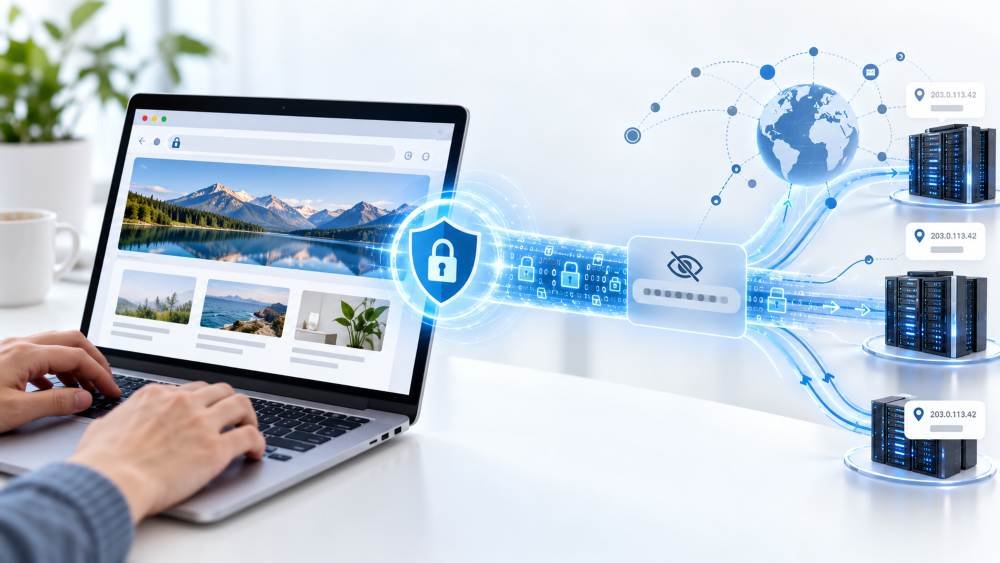
Because two things happen before the encryption starts. First, your device asks a DNS resolver for the IP address behind the name you typed. By default that resolver belongs to your ISP, and the question travels in plain text. Second, your browser opens a TLS connection, and its first message, the ClientHello, carries the server name in the clear so the server can pick the right certificate when thousands of sites share one IP address.
The 98.6% figure deserves a caveat. It comes from Cloudflare Radar’s measurement of requests on its own network between June 16 and July 14, 2026, as reported by TechnologyChecker. Treat it as a strong estimate, not a census of the web.
Did you know? Moving to HTTP/3 did not fix this. QUIC protects its first packets with keys derived from public values (RFC 9001), so a network observer can still read the server name.
What changes with Encrypted Client Hello in 2026?
On March 3, 2026, the IETF published RFC 9849, “TLS Encrypted Client Hello,” as a Proposed Standard. ECH encrypts the ClientHello, including the server name and the ALPN list, so someone watching your connection stops reading the site you asked for. Support is arriving fast. According to a May 2026 review by Packet Guru, Firefox has it on by default since version 119 when DNS over HTTPS is active, Chrome and Edge enable it for users with secure DNS, and Safari uses it opportunistically without a user toggle. Cloudflare turns it on by default for proxied sites, free plans included. That review is a single third-party source and browser versions move quickly, so check your own settings.
Two conditions apply, and the hype tends to skip them:
- The site must publish its ECH key in an HTTPS DNS record (RFC 9460). No record, no ECH for that domain.
- Your DNS must be encrypted too. Without DNS over HTTPS or DNS over TLS, an attacker on the path can strip the key and force a plain handshake.
Then comes what ECH leaves behind: the destination IP address, the timing and the volume of your traffic. A study by Nguyen Phong Hoang, Arian Akhavan Niaki, Michalis Polychronakis and Phillipa Gill (PoPETs, 2021) tested exactly that scenario. Assuming DNS and server names were already encrypted, an observer watching only destination IP addresses identified 84% of about 208,000 tested websites, and 92% of the popular ones. The match decayed over time, to about 70% after two months. The crawls ran in March to May 2020 from a single US academic network, so the numbers describe a lab, not your living room.
A more recent paper pushes the other way. Deng and colleagues (arXiv, October 2025) report that website fingerprinting attacks reaching over 90% accuracy in controlled experiments degrade significantly under realistic conditions, which makes them hard to apply directly in practice. Our reading, which is an opinion and not a finding of either paper: ECH helps most for sites hosted behind large CDNs where thousands of domains share one IP address, while a small site on its own dedicated IP stays easy to spot.
What does your ISP do with your browsing data?
That depends on your country, and the gap is wide.
- United States: on April 3, 2017, President Trump signed S.J.Res. 34, which repealed the FCC’s 2016 broadband privacy rules. Those rules required express consent before ISPs used personal data for marketing. The Senate vote was 50 to 48 and the House vote 215 to 205 (Orrick, 2017). In October 2021 the FTC staff report “Look What ISPs Know About You” studied the six largest US providers and three of their ad tech affiliates. It found that many of them can access 100% of their customers’ unencrypted traffic, that they collect and use data more extensively than consumers expect, and that opt-outs are hard to use. The report did not label any practice unfair or deceptive.
- United Kingdom: under the Investigatory Powers Act, providers such as BT, Sky, Virgin Media and TalkTalk can be ordered to keep internet connection records for up to 12 months. The core fields are the account reference, source and destination IP address and port, and timestamps. Reading content requires a warrant (ISPreview, 2017; source to verify for current practice).
- Elsewhere: rules differ by country and by provider, so check your national data protection authority before assuming anything.
Read the table again with the FTC finding in mind. Everything marked “Visible” in the HTTPS column is data your provider can log by design. Whether it sells, shares or merely stores it is a question for its privacy policy.
Which settings actually shrink what your ISP sees?
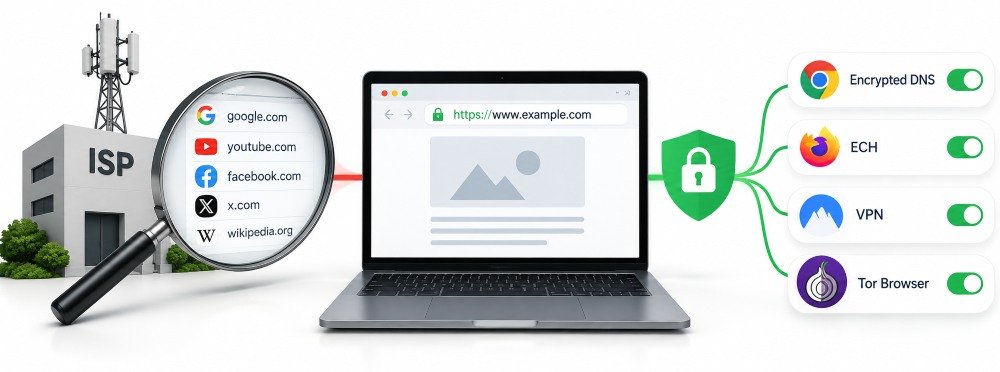
Start with a baseline: what is my IP address right now? Write the answer down, since it is the address your ISP assigned you and the one every site you visit receives. Then work through these steps in order, from free to paid.
- Turn on encrypted DNS in your browser. In Chrome, look for “Use secure DNS” under Privacy and security, Security. In Firefox, open Privacy and Security and find DNS over HTTPS. Menu labels change between versions. Mozilla already made DoH the default for US Firefox users in February 2020.
- Keep your browser current. ECH only works if your browser ships it and the site publishes the key.
- Use a VPN when the threat is your ISP or a hostile network. Switch it on and run the IP check again: the address should change, and so should what your provider can read.
- Use Tor Browser for the strongest protection. Your ISP sees that you connect to the Tor network, not which sites you reach through it, at the price of speed.
Does a VPN hide your browsing from your ISP?
From your ISP, yes: it sees an encrypted tunnel to one VPN server, plus timing and volume. The names and destinations do not vanish, though. Your VPN provider now sees them. That is why a no-logs claim only counts when an independent audit backs it up.
Our take: do the free fixes first. Encrypted DNS takes one minute and costs nothing. Skip free VPN apps: a provider that earns nothing from you has to earn it elsewhere, and we would not hand it the browsing history you are trying to keep from your ISP. Pay for a VPN with a published independent audit if you use public Wi-Fi often or want your domains out of your provider’s logs. Skip the VPN altogether if your only goal is to stop advertisers following you, because cookies and browser fingerprinting work with or without it.
Frequently asked questions
Does incognito mode stop my ISP from seeing my browsing?
No. Private windows only skip saving history, cookies and form data on your device. The connection looks identical from the outside, so your ISP sees the same domains as in a normal window.
Can my ISP see what I type into Google?
Not the search terms. Over HTTPS the query sits inside the encrypted part of the request, so your ISP sees a visit to google.com, the time and the data volume, but not what you searched for.
Does switching to 1.1.1.1 or 8.8.8.8 hide my DNS lookups?
Only if the lookups are encrypted. A public resolver reached over plain DNS still sends readable packets through your ISP’s network, so it sees which resolver you use and every name you ask for. Enable DNS over HTTPS or DNS over TLS to close that gap.
Can my ISP see which apps I use?
Often, yes. Apps contact named servers, and those names and IP addresses are visible in the same way as website domains. Your ISP may not see what you do inside an app, but it can often tell which service you are talking to.
Can my ISP read my WhatsApp or Signal messages?
No. Those messages are end-to-end encrypted, so even the services themselves cannot read them in transit. Your ISP still sees that your phone talks to the service’s servers and how much data flows.
Does mobile data change any of this?
The principle stays the same, with your mobile carrier in the ISP role. It sees DNS lookups, destination IP addresses and connection timing on its network. The same defenses, encrypted DNS and a VPN, apply on a phone.
Disclaimer
This article is for general informational purposes only and does not constitute legal, technical or security advice. Browser features, provider practices and data protection laws change frequently and vary by country, so verify current settings and rules before relying on them. Mentions of products, services and third-party sources are for reference only and do not imply endorsement. For advice on your specific situation, consult a qualified security professional or legal adviser.