Starting A Gamepad Blog On WordPress? Don’t Forget These HostGator Coupons
Plenty of controller blogs start the same way. You fix your own stick drift, write up what worked, and realize you…

My 7 year old finds the PS5 Smaller Controller too big and heavy, she holds it awkwardly and gets tired. Is the PS4 controller smaller? Are there smaller PS5 controllers? She plays Minecraft and Lego games on PS5. I want something comfortable but I don't want to buy something that stops working with the console.
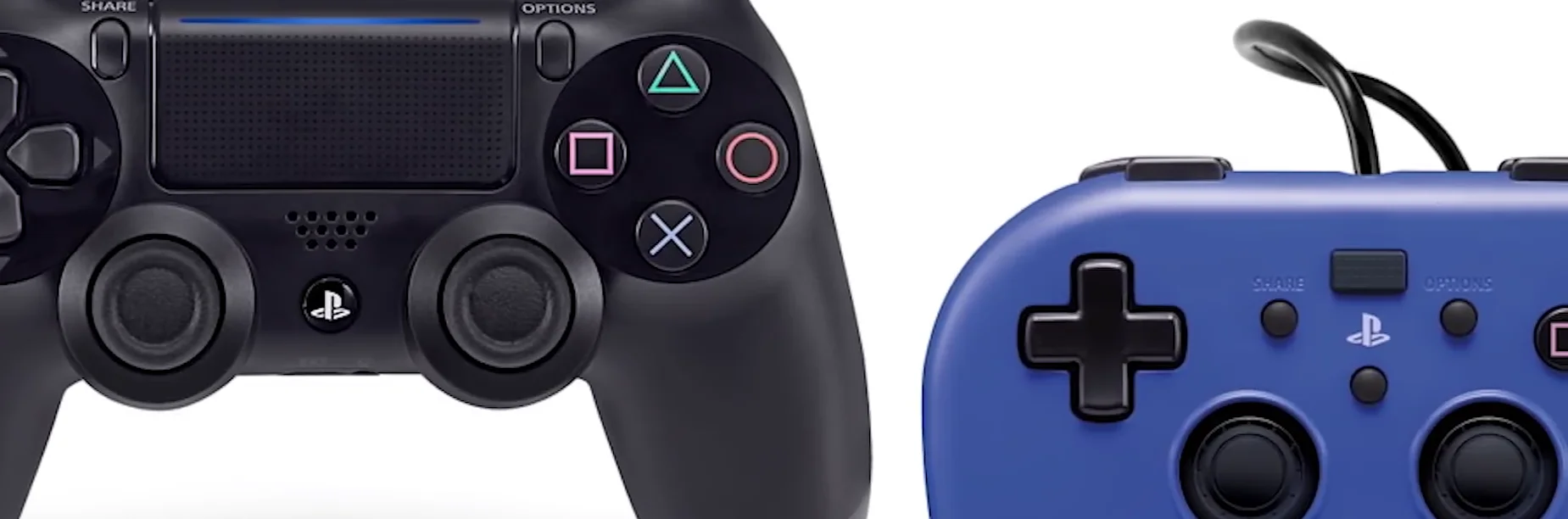
The DualShock 4 is noticeably smaller and lighter than the DualSense and works on PS5 with PS4 games, but not with PS5 games. For PS5 games, look at officially licensed compact PS5 controllers, and test whichever one you buy when it arrives.

The DualSense is a big controller for small hands, and it is noticeably heavier than the DualShock 4, so her experience is very common.
The catch with the PS4 controller is compatibility. On a PS5, the DualShock 4 works with PS4 games, which the PS5 runs through backward compatibility, but PS5 games will not accept it. So check which versions she plays. If Minecraft and the Lego games are the PS4 versions running on the PS5, a DualShock 4 is a cheaper, more comfortable option for them. If they are PS5 versions, it will not work.
For PS5 games, the option is a licensed controller. Sony licenses other makers to produce PS5 controllers, and some are smaller and lighter than the DualSense, often wired. They usually leave out features such as adaptive triggers and the full haptics, which matters very little for a seven year old playing Lego games. Look for the official licence marking on the box, because that is what guarantees PS5 compatibility.
Whatever you choose, test it on arrival. A quick run through the button and stick tests catches a faulty unit while the return window is still open, and compact controllers from lesser-known brands vary more in quality.
Tested on: Applies to DualSense, DualShock 4 and licensed PS5 controllers. PS5 compatibility rules per PlayStation's controller support pages.
Checked by Sneha Reddy on . How we verify answers
Endurance Tester And Controller Reviewer at Gamepad Tester
Oliver runs endurance trials. A controller that feels excellent in the shop can lose its button feel in months, so his testing deliberately pushes mechanical face-button switches, bumpers and triggers through extended, repeated actuation to see how quickly tactility and elasticity fall away. The same approach applies to stick modules and to the rubber on the sticks themselves. On Gamepad Tester he contributes the long-term reliability side of the buying guides, and verifies answers about buttons that have gone soft, mushy or inconsistent with age.
 Calder WrightFront-End Web Architect And Gamepad API Lead
 Elena RostovaHardware Diagnostics Engineer
 Garrett LindsayHardware Reviewer And Input Performance Specialist
 Venom’s Tech (Abhishek)Peripheral Reviewer And Tech Journalist
 Chloe HendersonHall Effect And Thumbstick Analyst
 Thiago AlvesHardware Repair Educator
 Devon MillerLow Latency And Input Timing Engineer
 Liam DaviesBluetooth And Wireless Test Engineer
Each answer is written by the specialist who owns that part of the hardware, tested on a real controller, and checked by a second team member. How we verify answers
Answers are free general guidance from the Gamepad Tester Team and the community. Opening a controller or replacing a thumbstick module can void your warranty, so check the maker's support or warranty first. Battery and soldering work carries a real risk of damage or injury.
Every test runs in your own browser with the Gamepad API. No sign up, no download, and your controller data never leaves your device.
Plenty of controller blogs start the same way. You fix your own stick drift, write up what worked, and realize you…
If you play games on a PC, whether that means ranked matches every night or a slow campaign on the weekend, you know…
Sony has not announced the PlayStation 6. That is the honest starting point, because almost everything circulating…
The newest replies from players and the Gamepad Tester Team.