Playing Mobile Games With A Controller: What Works, What Doesn’t, And What To Test Before You Spend
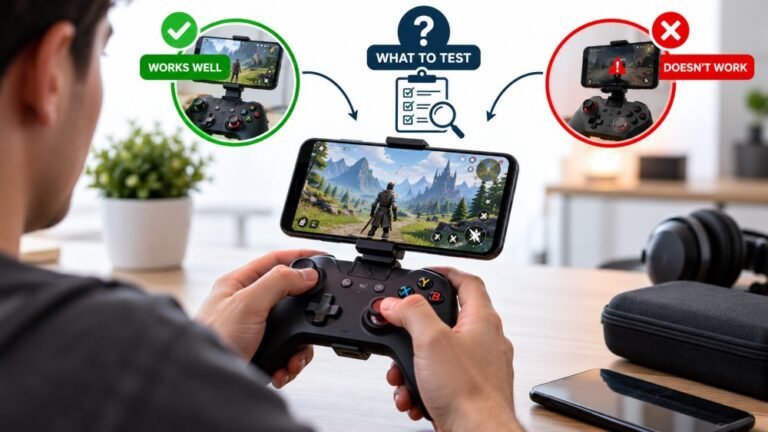
You paired the controller, the light went solid, your phone said "Connected," and then the game did absolutely…

Took me weeks to spot the pattern. Controller is rock solid, then it starts stuttering, and every time it happens my phone is sitting next to my PC. Move the phone a metre away and it is perfect again. Reproduced it about ten times now so I am confident. Your connection stability test shows dropouts appearing within about thirty seconds of putting the phone down. Why would a phone do that and is there anything I can do other than keep the phone away?
Your phone is transmitting on the same 2.4GHz band, most likely over Wi-Fi or its own Bluetooth, right next to your adapter. Moving the adapter away from the desk surface fixes it more permanently than moving the phone.

That is excellent diagnostic work, and the mechanism is straightforward once you have found the pattern.
Your phone is a 2.4GHz transmitter. Its Wi-Fi radio, its own Bluetooth connections to a watch or earbuds, and any hotspot or file transfer all operate in the same band your controller's Bluetooth link uses. At a distance of a few centimetres from your PC's Bluetooth adapter, the phone's signal arrives far stronger than your controller's does from across the desk, and it simply drowns it out. Bluetooth has frequency hopping to cope with interference, but a strong transmitter sitting almost on top of the receiver overwhelms that.
The thirty-second delay you noticed fits too: it is usually the phone doing something periodic, syncing, scanning for networks, or waking its radio, rather than transmitting constantly.
The better fix than policing where your phone lives is to move the receiver. If your Bluetooth adapter is a USB dongle, put it on a short USB extension cable and raise it ten or twenty centimetres off the desk, away from the back of the case and away from the surface where your phone, keyboard dongle and cables all live. That single change resolves most of these, because it gets the receiver out of the noisiest layer of the desk. If your Bluetooth is built into the motherboard, its antenna is at the rear of the case among all the cabling, which is one of the worst possible positions, and a cheap USB dongle on an extension often outperforms it noticeably.
Also worth checking: the adapter or dongle should not be in a USB 3 port, since those leak noise across this band, and it should not sit next to a 2.4GHz mouse or keyboard dongle.
If you want the problem gone entirely rather than mitigated, the cable removes the radio from the equation altogether and gives you lower latency as a bonus.
Tested on: DualSense CFI-ZCT1W over Bluetooth on Windows 11 24H2, with a phone at 5cm, 30cm and 100cm from the adapter, with phone Wi-Fi on and off, and with the adapter on the rear panel, in a front USB 2 port, and raised 15cm on an extension. The raised adapter showed no dropouts with the phone at 5cm.
Checked by Liam Davies on . How we verify answers
Low Latency And Input Timing Engineer at Gamepad Tester
Devon is a low latency engineer. On a browser-based latency test the easiest mistake is measuring the wrong thing: network round trips, render queues and browser throttling can all add milliseconds that have nothing to do with the controller. His work is isolating the input path so that what the test reports is the hardware delay, and documenting the conditions under which the reading is trustworthy. On Gamepad Tester he owns the latency test and the input lag topic, and checks any answer that quotes a millisecond figure.
 Calder WrightFront-End Web Architect And Gamepad API Lead
 Elena RostovaHardware Diagnostics Engineer
 Garrett LindsayHardware Reviewer And Input Performance Specialist
 Venom’s Tech (Abhishek)Peripheral Reviewer And Tech Journalist
 Chloe HendersonHall Effect And Thumbstick Analyst
 Thiago AlvesHardware Repair Educator
 Liam DaviesBluetooth And Wireless Test Engineer
 Nadia BrooksEsports Performance Consultant
Each answer is written by the specialist who owns that part of the hardware, tested on a real controller, and checked by a second team member. How we verify answers
Answers are free general guidance from the Gamepad Tester Team and the community. Opening a controller or replacing a thumbstick module can void your warranty, so check the maker's support or warranty first. Battery and soldering work carries a real risk of damage or injury.
Every test runs in your own browser with the Gamepad API. No sign up, no download, and your controller data never leaves your device.
You paired the controller, the light went solid, your phone said "Connected," and then the game did absolutely…
There is a particular kind of bad session that never gets diagnosed. You lose a duel you should have won. Your car…
Every button test came back clean, every stick calibration passed without a single flag, and yet every fifteen or…
The newest replies from players and the Gamepad Tester Team.