Small Input Problems That Quietly Ruin Your Game Sessions
There is a particular kind of bad session that never gets diagnosed. You lose a duel you should have won. Your car…

My son's left Joy-Con 2 has started drifting. The character slowly walks up on its own in the Mario Kart menus and sometimes in races. We've had the Switch 2 since launch day and I honestly assumed the new ones would be fixed. I tried to connect it to my laptop to use your test but the laptop wouldn't find it. Is calibrating it on the console worth doing, and what are our options in the UK if it doesn't work?
Yes, try calibration first because it is free and quick, but keep expectations realistic. Nintendo confirmed the Joy-Con 2 sticks are not Hall effect, so wear-related drift is possible. If the drift returns after calibrating, go to Nintendo's repair service rather than opening it.

I am sorry, that is frustrating after waiting for the new console, and you are not alone in assuming the problem had been designed out. Nintendo said publicly before launch that the Joy-Con 2 sticks are not Hall effect, so they are still a contact-type stick that can wear, even though the design is new.
Calibration is worth doing for one reason: it tells you which kind of drift you have. If the stick reports a steady wrong centre, calibration fixes it. If the sensor is wearing, the centre keeps moving and the drift returns soon after calibrating. Either way you learn something in five minutes.
On the laptop, please do not worry that you did something wrong. PC support for Joy-Con 2 is patchy and many laptops will not see them at all. Use the console instead. The stick calibration screen in System Settings, in the controllers section, also shows the live stick position. Watch the indicator with the Joy-Con resting on a table and nothing touching it. A marker that sits still in the centre is healthy; one that slides or sits off centre confirms drift.
If calibration does not hold, contact Nintendo's support for a repair rather than opening it up. Opening a nearly new Joy-Con is fiddly, can affect what Nintendo will do for you, and replacement parts for this generation are less established than for the original Joy-Con. In the UK you also have consumer rights through the retailer for faults that appear early, which are worth raising alongside Nintendo's own process.
Tested on: Applies to Joy-Con 2 on Nintendo Switch 2 with current system software. Stick type per Nintendo's public statements before launch; calibration steps follow Nintendo's published calibration guidance for Switch controllers.
Checked by Thiago Alves on . How we verify answers
Data Analyst, Stick Drift And Wear Patterns at Gamepad Tester
Sarah is a data scientist working on stick drift diagnostics. Working from the anonymised test exports players attach to their questions, she looks for the patterns that distinguish a stick that needs recalibrating from one whose potentiometer is physically worn out, and at what point in a module's life the reading usually starts to move. The aim is a practical answer to the question players actually ask: clean it, calibrate it, or replace it. On Gamepad Tester she reviews the drift answers and the thresholds quoted in them.
 Calder WrightFront-End Web Architect And Gamepad API Lead
 Elena RostovaHardware Diagnostics Engineer
 Garrett LindsayHardware Reviewer And Input Performance Specialist
 Venom’s Tech (Abhishek)Peripheral Reviewer And Tech Journalist
 Chloe HendersonHall Effect And Thumbstick Analyst
 Thiago AlvesHardware Repair Educator
 Devon MillerLow Latency And Input Timing Engineer
 Liam DaviesBluetooth And Wireless Test Engineer
Each answer is written by the specialist who owns that part of the hardware, tested on a real controller, and checked by a second team member. How we verify answers
Answers are free general guidance from the Gamepad Tester Team and the community. Opening a controller or replacing a thumbstick module can void your warranty, so check the maker's support or warranty first. Battery and soldering work carries a real risk of damage or injury.
Every test runs in your own browser with the Gamepad API. No sign up, no download, and your controller data never leaves your device.
There is a particular kind of bad session that never gets diagnosed. You lose a duel you should have won. Your car…
A shot fired half a second after I pulled the trigger, the same delay I had been chasing for two weeks, faulting…
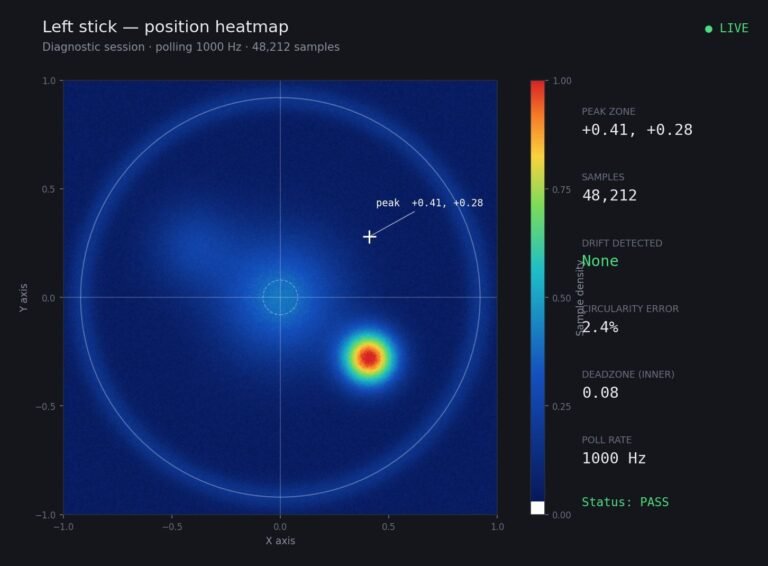
Someone posted a stick drift heatmap in a forum thread asking if their controller was dying: a red and orange blob…
The newest replies from players and the Gamepad Tester Team.