Small Input Problems That Quietly Ruin Your Game Sessions
There is a particular kind of bad session that never gets diagnosed. You lose a duel you should have won. Your car…

is there seriously no way to calibrate an xbox controller on windows 11?? the accessories app has nothing for sticks on the normal controller, joy.cpl has a calibrate button but games dont seem to care. my right stick reads 0.04 X 0.05 Y at rest on your test which makes my aim slowly drift in apex. is it the controller or something i can fix in settings. i dont want to buy an elite just for this lol
There is no user calibration for the standard Xbox controller. The joy.cpl calibration only applies to old DirectInput games, while modern games read the controller through XInput. At 0.04 to 0.05, a clean plus a deadzone set just above your measured value is the fix.

You have found the gap correctly. The standard Xbox Wireless Controller has no stick calibration you can run yourself, and the Xbox Accessories app does not offer one for it. The calibrate button in joy.cpl does exist, but it stores its result in Windows for DirectInput, the older input path. Apex and almost every modern PC game read the controller through XInput, which ignores that calibration. That is why nothing changed.
The good news is that your numbers are mild. A resting value of 0.04 to 0.05 sits at the edge of normal sensor noise for this controller. It becomes visible in Apex because a low deadzone turns tiny constant input into slow camera movement. Two things help, in this order.
First, clean the right stick. Light, steady offsets in that range are often grime rather than wear, and a clean can bring them back to 0.02 or below.
Second, set a deadzone that matches your measurement instead of guessing. Use the deadzone test to find the real resting value, then set the in-game or Steam Input inner deadzone a touch above it. Not double it, just above it. That removes the drift without costing you fine aim.
If the reading keeps climbing over the coming months, that is wear and the stick module is the long-term fix. An Elite Series 2 adds adjustable stick sensitivity curves in the Accessories app, but it still uses potentiometer sticks, so on its own it does not solve drift.
Tested on: Applies to Xbox Wireless Controller Model 1914 on Windows 11 over USB-C and Bluetooth with Chrome or Edge. Firmware steps checked against Xbox support's controller update guide.
Checked by Arjun Mehta on . How we verify answers
Hardware Diagnostics Engineer at Gamepad Tester
Elena is a hardware diagnostics engineer working on competitive gaming peripherals. She designs test benches that put a number on the faults players usually describe by feel: outer deadzone error, circularity variance, uneven travel between the left and right stick, and the drift that appears only after a pad has warmed up. Her work covers custom and pro-tier hardware such as the Xbox Elite range and SCUF-style builds, where small geometry errors decide whether a shot lands. On Gamepad Tester she writes and checks the answers about deadzone readings and stick accuracy, and confirms a fix on real hardware before it is published.
 Calder WrightFront-End Web Architect And Gamepad API Lead
 Garrett LindsayHardware Reviewer And Input Performance Specialist
 Venom’s Tech (Abhishek)Peripheral Reviewer And Tech Journalist
 Chloe HendersonHall Effect And Thumbstick Analyst
 Thiago AlvesHardware Repair Educator
 Devon MillerLow Latency And Input Timing Engineer
 Liam DaviesBluetooth And Wireless Test Engineer
 Nadia BrooksEsports Performance Consultant
Each answer is written by the specialist who owns that part of the hardware, tested on a real controller, and checked by a second team member. How we verify answers
Answers are free general guidance from the Gamepad Tester Team and the community. Opening a controller or replacing a thumbstick module can void your warranty, so check the maker's support or warranty first. Battery and soldering work carries a real risk of damage or injury.
Every test runs in your own browser with the Gamepad API. No sign up, no download, and your controller data never leaves your device.
There is a particular kind of bad session that never gets diagnosed. You lose a duel you should have won. Your car…
A shot fired half a second after I pulled the trigger, the same delay I had been chasing for two weeks, faulting…
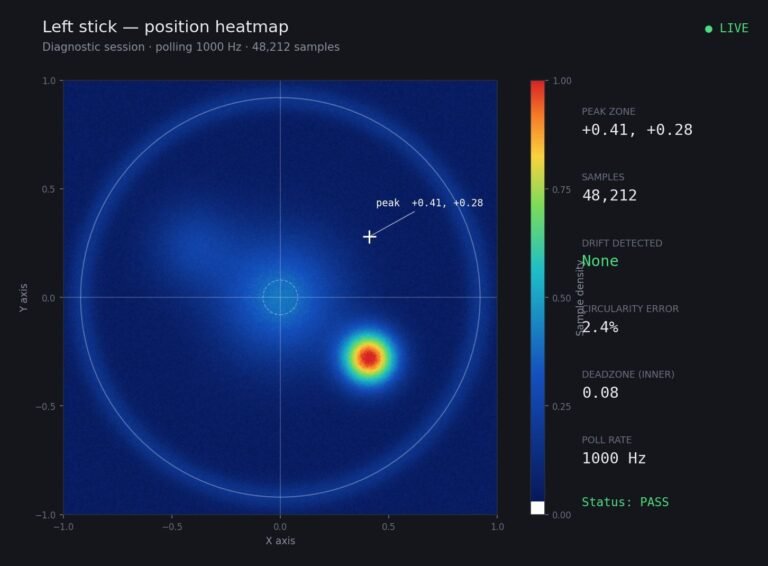
Someone posted a stick drift heatmap in a forum thread asking if their controller was dying: a red and orange blob…
The newest replies from players and the Gamepad Tester Team.