How To Protect A Basement Gaming Setup From Storm Flooding
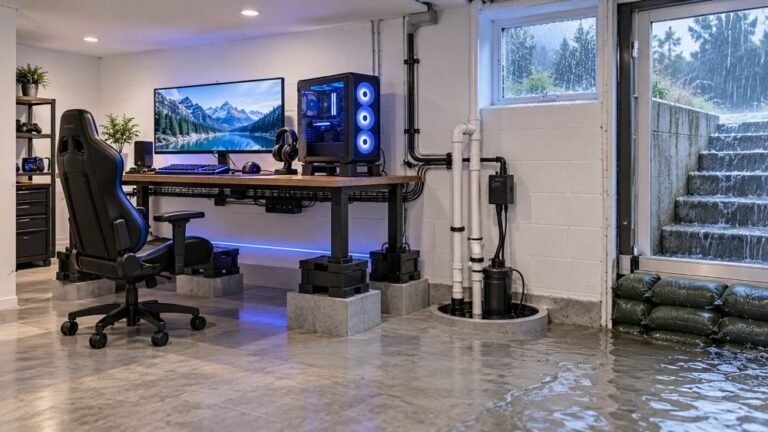
The basement is the obvious place to put a gaming room. It is cooler, it is quieter, nobody complains about the noise…

Random shutdowns. It will be fine for twenty minutes then just power off completely, not disconnect, actually off, and I have to press the button to turn it back on. Battery shows plenty of charge when it comes back. On your battery telemetry test the reported level is fine right up to the moment it dies. It is not a dropout because the controller is genuinely off. Happens maybe twice an evening, and always when I am actually playing rather than sitting in a menu.
Powering off under load with charge remaining is a battery that sags when the rumble motors draw current. Weak contacts or an aged cell both do it, and the during-play detail is the giveaway.

The detail that solves this is that it only happens while you are playing and never in a menu. That is a load-dependent failure, and it narrows things considerably.
A controller powers off, rather than disconnecting, when its supply voltage drops below the minimum its microcontroller needs. In a menu the controller draws very little. While playing, the rumble motors fire and the draw spikes. A cell with high internal resistance, or a battery contact with poor tension, cannot hold voltage through that spike, the voltage sags below the cut-off, and the controller shuts down. When it restarts, the cell has recovered its resting voltage and the gauge reports plenty of charge, which is exactly the contradiction you have observed. The gauge is not lying; it is reading a recovered cell.
So your test result showing a healthy level right up to the shutdown is consistent with this rather than against it, and it is useful evidence.
Two causes and both are cheap. Battery contact tension is the first: the springs in the AA compartment weaken, and a momentary loss of contact under vibration does this. Press the battery door firmly while playing and see if the shutdowns stop, which is a free diagnostic. The second is the cell itself, whether that is a rechargeable pack or AAs. Partially worn rechargeables are a very common cause, and brand-new cheap rechargeables are almost as bad because their internal resistance is high from the start.
A quick confirmation test worth doing: turn vibration off in a game and play for an hour. If the shutdowns stop entirely, the load is confirmed as the trigger and the battery path is the fault. That is not a fix, since you presumably want rumble, but it tells you where to spend money.
If fresh good quality cells and clean, tensioned contacts do not resolve it, the controller's own power circuit is the remaining suspect, which is rarer.
Tested on: Xbox Wireless Controller Model 1914 with a new pack, a 3-year pack, fresh NiMH AAs, worn NiMH AAs and budget rechargeables, with and without rumble active, and with one battery spring deliberately flattened. Load-dependent shutdowns reproduced with the worn pack, the budget cells and the flattened spring, and in none of the healthy configurations.
Checked by Oliver Sterling on . How we verify answers
Hardware QA Lead at Gamepad Tester
Sneha leads manual hardware QA. Her lab takes controllers that arrive with no published specifications, mostly budget and mobile pads, and puts each one through the same fixed set of checks: every button and axis registers, deadzones are inside tolerance, rumble motors both run, the battery holds its claimed runtime, and the pad still passes after a charge cycle or two. Pads that fail are documented rather than quietly dropped. On Gamepad Tester she reviews the answers about cheap controllers behaving unpredictably and about battery and charging faults.
 Calder WrightFront-End Web Architect And Gamepad API Lead
 Elena RostovaHardware Diagnostics Engineer
 Garrett LindsayHardware Reviewer And Input Performance Specialist
 Venom’s Tech (Abhishek)Peripheral Reviewer And Tech Journalist
 Chloe HendersonHall Effect And Thumbstick Analyst
 Thiago AlvesHardware Repair Educator
 Devon MillerLow Latency And Input Timing Engineer
 Liam DaviesBluetooth And Wireless Test Engineer
Each answer is written by the specialist who owns that part of the hardware, tested on a real controller, and checked by a second team member. How we verify answers
Answers are free general guidance from the Gamepad Tester Team and the community. Opening a controller or replacing a thumbstick module can void your warranty, so check the maker's support or warranty first. Battery and soldering work carries a real risk of damage or injury.
Every test runs in your own browser with the Gamepad API. No sign up, no download, and your controller data never leaves your device.
The basement is the obvious place to put a gaming room. It is cooler, it is quieter, nobody complains about the noise…
Long gaming sessions quickly expose controller flaws like fatigue, stick drift, wireless latency, and inconsistent…
Whether you're a casual gamer or a competitive player, a malfunctioning controller can ruin your gaming experience…
The newest replies from players and the Gamepad Tester Team.