Small Input Problems That Quietly Ruin Your Game Sessions
There is a particular kind of bad session that never gets diagnosed. You lose a duel you should have won. Your car…

Got the ROG Xbox Ally X at launch and now my right stick drifts. Camera slowly pans up and to the right in pretty much every game. Opened your gamepad tester in Edge and the right stick sits at 0.06 X, 0.08 Y with hands off. Left is fine. It started right after an Armoury Crate update so part of me thinks it's software. Is there a way to tell? I really don't want to send it in and lose it for weeks.
Both are possible, so calibrate first. The ROG Xbox Ally and Ally X use potentiometer sticks, not Hall effect, so wear is real, but a stale calibration after an update is common too. Run the Armoury Crate SE calibration and check whether the reading holds the next day.

You can separate the two fairly quickly, and the test you already ran is the right starting point.
First, the hardware background. Neither the ROG Xbox Ally nor the Ally X ships with Hall effect or TMR sticks; both use conventional potentiometer sticks. So wear-related drift is genuinely possible, and the right stick on a handheld takes a lot of steady pressure in third-person games.
Second, the software side. The built-in controller's stick calibration is handled through Armoury Crate SE, and updates can leave calibration or controller profiles in an odd state. A drift that started the same day as an update deserves a calibration before anything else.
The test tells you which one you have. If a fresh calibration brings the right stick back within about plus or minus 0.02 and it stays there for days, it was calibration. If it returns to near zero and then creeps back towards 0.06 and 0.08 within hours or a day or two, the sensor is wearing and calibration is just resetting the target each time.
If it is hardware, you have options beyond sending it away. GuliKit makes TMR replacement modules for the ROG Xbox Ally and Ally X, developed with ASUS and fitted without soldering. That is a reasonable home repair once you are out of warranty. While you are still covered, use the warranty; opening the device yourself can complicate a claim.
Tested on: Applies to ROG Xbox Ally X (RC73XA) and ROG Xbox Ally (RC73YA) on Windows 11 with Edge. Stick type per published coverage of the handhelds; replacement module details per GuliKit's launch coverage.
Checked by Chloe Henderson on . How we verify answers
Linux And Input Subsystem Engineer at Gamepad Tester
Lucas works on the Linux input subsystem. He follows how evdev registers a controller, how Steam Input sits on top of it and where the two disagree with the browser's view of the same device, which is the usual reason a pad behaves differently on a Steam Deck or a Linux desktop than on Windows. His testing targets parity: the same controller should produce the same reading on every operating system, and where it does not, the difference should be documented. On Gamepad Tester he handles the Linux and Steam Deck questions.
 Calder WrightFront-End Web Architect And Gamepad API Lead
 Elena RostovaHardware Diagnostics Engineer
 Garrett LindsayHardware Reviewer And Input Performance Specialist
 Venom’s Tech (Abhishek)Peripheral Reviewer And Tech Journalist
 Chloe HendersonHall Effect And Thumbstick Analyst
 Thiago AlvesHardware Repair Educator
 Devon MillerLow Latency And Input Timing Engineer
 Liam DaviesBluetooth And Wireless Test Engineer
Each answer is written by the specialist who owns that part of the hardware, tested on a real controller, and checked by a second team member. How we verify answers
Answers are free general guidance from the Gamepad Tester Team and the community. Opening a controller or replacing a thumbstick module can void your warranty, so check the maker's support or warranty first. Battery and soldering work carries a real risk of damage or injury.
Every test runs in your own browser with the Gamepad API. No sign up, no download, and your controller data never leaves your device.
There is a particular kind of bad session that never gets diagnosed. You lose a duel you should have won. Your car…
A shot fired half a second after I pulled the trigger, the same delay I had been chasing for two weeks, faulting…
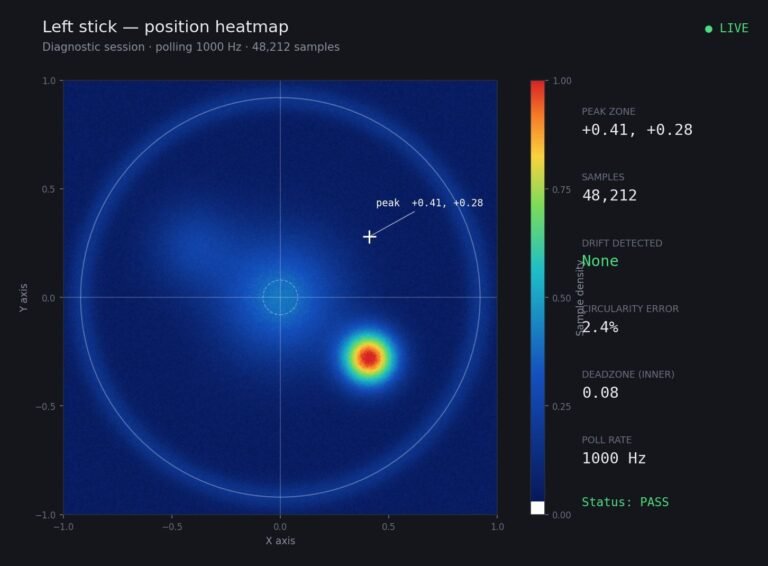
Someone posted a stick drift heatmap in a forum thread asking if their controller was dying: a red and orange blob…
The newest replies from players and the Gamepad Tester Team.