Small Input Problems That Quietly Ruin Your Game Sessions
There is a particular kind of bad session that never gets diagnosed. You lose a duel you should have won. Your car…

hi, sorry if this is a silly question. my daughter's switch left joy-con drifts to the left and i have followed the nintendo calibration steps three separate times now. each time it says calibration complete but the drift comes straight back when we play. i am not very technical so i might be doing something wrong. i tried your drift test on my laptop with the joy-con connected by bluetooth and it shows the stick sitting at about -0.22 X. does calibration not fix this kind of thing? i don't want to keep messing with settings if it is pointless.
You are not doing it wrong. Calibration only re-learns the centre point, so it cannot help a stick that keeps moving away from centre. At -0.22 the Joy-Con needs servicing.

Nothing you did was wrong, and this is the single most common misunderstanding about drift, so please do not feel silly about it.
Calibration does one job: it takes a reading while the stick is centred and tells the console to treat that reading as the new zero. If the stick reports a stable wrong value, calibration fixes it permanently. Your case is the other kind. The sensor inside the Joy-Con is worn, so the value it reports from the centre position keeps changing. Calibration sets zero to whatever it read at that moment, then the sensor moves again and you are back to drifting. You could calibrate it thirty times and get the same result, because you are re-measuring a target that will not hold still.
The -0.22 reading is what makes this clear cut. On this hardware anything past about 0.10 at rest is physical wear. Joy-Con sticks are known for this and the good news is that Nintendo treat it as a repair matter rather than a you-broke-it matter. In the US, Canada and the UK the usual route is a service request for the Joy-Con only, and people frequently report it being handled free of charge even outside the standard warranty window. Send the Joy-Con on its own, not the console.
Two things before you do. Take any skin or cover off that Joy-Con, because a tight cover can press on the stick housing and mimic drift, and that one is free to rule out. And if you want a repair you can do at home instead, the stick module in a Joy-Con is replaceable, but it is fiddly work with a ribbon cable and I would not recommend it as a first repair.
Tested on: Joy-Con (L) HAC-015, system 19.0.1, Bluetooth to Windows 11, Edge 141 and Chrome 141. Compared with a replacement Joy-Con resting at 0.01 X.
Checked by Chloe Henderson on . How we verify answers
Data Analyst, Stick Drift And Wear Patterns at Gamepad Tester
Sarah is a data scientist working on stick drift diagnostics. Working from the anonymised test exports players attach to their questions, she looks for the patterns that distinguish a stick that needs recalibrating from one whose potentiometer is physically worn out, and at what point in a module's life the reading usually starts to move. The aim is a practical answer to the question players actually ask: clean it, calibrate it, or replace it. On Gamepad Tester she reviews the drift answers and the thresholds quoted in them.
 Calder WrightFront-End Web Architect And Gamepad API Lead
 Elena RostovaHardware Diagnostics Engineer
 Garrett LindsayHardware Reviewer And Input Performance Specialist
 Venom’s Tech (Abhishek)Peripheral Reviewer And Tech Journalist
 Chloe HendersonHall Effect And Thumbstick Analyst
 Thiago AlvesHardware Repair Educator
 Devon MillerLow Latency And Input Timing Engineer
 Liam DaviesBluetooth And Wireless Test Engineer
Each answer is written by the specialist who owns that part of the hardware, tested on a real controller, and checked by a second team member. How we verify answers
Answers are free general guidance from the Gamepad Tester Team and the community. Opening a controller or replacing a thumbstick module can void your warranty, so check the maker's support or warranty first. Battery and soldering work carries a real risk of damage or injury.
Every test runs in your own browser with the Gamepad API. No sign up, no download, and your controller data never leaves your device.
There is a particular kind of bad session that never gets diagnosed. You lose a duel you should have won. Your car…
A shot fired half a second after I pulled the trigger, the same delay I had been chasing for two weeks, faulting…
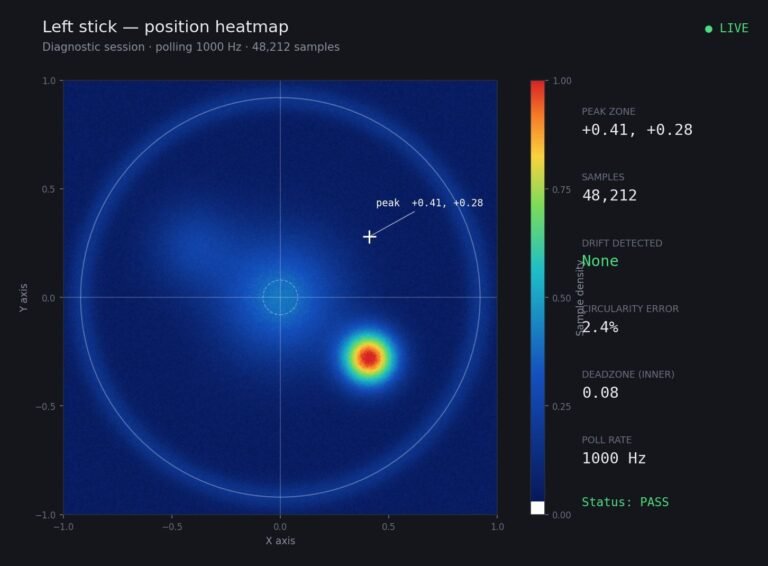
Someone posted a stick drift heatmap in a forum thread asking if their controller was dying: a red and orange blob…
The newest replies from players and the Gamepad Tester Team.