How To Protect A Basement Gaming Setup From Storm Flooding
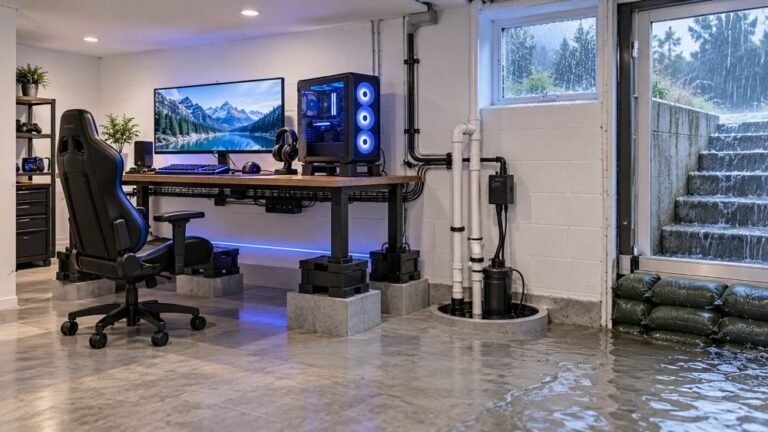
The basement is the obvious place to put a gaming room. It is cooler, it is quieter, nobody complains about the noise…

I want to charge my DualSense from a USB wall plug instead of the PS5. Is a phone charger safe, including a fast charger? Sometimes it doesn't seem to charge from my laptop charger.
Generally yes. The DualSense charges over USB-C and draws only what it needs, so a reputable phone charger works. Fast chargers negotiate power, so they will not force too much into it. If one charger does not work, try another cable and a standard USB charger; use quality, certified chargers.

A good USB wall charger is fine for a DualSense.
The controller charges through its USB-C port and only draws the power it needs. Modern fast chargers negotiate power with the device, so a phone fast charger will not push more than the controller accepts.
Why one charger might not work. Some chargers, often laptop chargers, only offer power at higher voltages, or expect a device to negotiate in a way the controller does not, so they may not charge it at all. That is a compatibility quirk, not damage. Cables matter too: try a different USB-C cable.
Practical tips:
Use reputable chargers. Very cheap, uncertified chargers are the real risk, for any device.
Check the light. The light bar pulses orange while charging, and the light turns off when full, when the controller is off.
Avoid heat. Charge somewhere cool, not on top of a hot console vent.
If charging stops working on every charger and cable, the controller's USB-C port or battery may need attention.
Tested on: Applies to DualSense controllers charged over USB-C. Guidance reflects general USB charging behaviour and Sony's controller support information.
Checked by Thiago Alves on . How we verify answers
Hardware QA Lead at Gamepad Tester
Sneha leads manual hardware QA. Her lab takes controllers that arrive with no published specifications, mostly budget and mobile pads, and puts each one through the same fixed set of checks: every button and axis registers, deadzones are inside tolerance, rumble motors both run, the battery holds its claimed runtime, and the pad still passes after a charge cycle or two. Pads that fail are documented rather than quietly dropped. On Gamepad Tester she reviews the answers about cheap controllers behaving unpredictably and about battery and charging faults.
 Calder WrightFront-End Web Architect And Gamepad API Lead
 Elena RostovaHardware Diagnostics Engineer
 Garrett LindsayHardware Reviewer And Input Performance Specialist
 Venom’s Tech (Abhishek)Peripheral Reviewer And Tech Journalist
 Chloe HendersonHall Effect And Thumbstick Analyst
 Thiago AlvesHardware Repair Educator
 Devon MillerLow Latency And Input Timing Engineer
 Liam DaviesBluetooth And Wireless Test Engineer
Each answer is written by the specialist who owns that part of the hardware, tested on a real controller, and checked by a second team member. How we verify answers
Answers are free general guidance from the Gamepad Tester Team and the community. Opening a controller or replacing a thumbstick module can void your warranty, so check the maker's support or warranty first. Battery and soldering work carries a real risk of damage or injury.
Every test runs in your own browser with the Gamepad API. No sign up, no download, and your controller data never leaves your device.
The basement is the obvious place to put a gaming room. It is cooler, it is quieter, nobody complains about the noise…
Long gaming sessions quickly expose controller flaws like fatigue, stick drift, wireless latency, and inconsistent…
Whether you're a casual gamer or a competitive player, a malfunctioning controller can ruin your gaming experience…
The newest replies from players and the Gamepad Tester Team.