How To Protect A Basement Gaming Setup From Storm Flooding
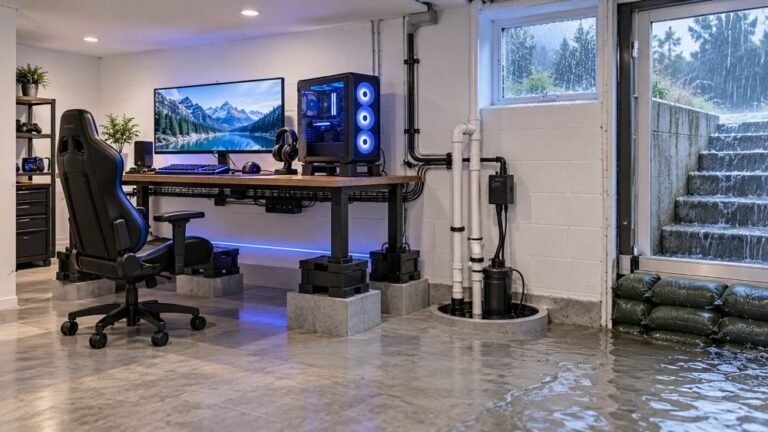
The basement is the obvious place to put a gaming room. It is cooler, it is quieter, nobody complains about the noise…

Fitted a new Battery Percentage and the runtime is great, much better than before. But the percentage reading is nonsense now. It shows 100% for hours then drops to 20% quickly, and sometimes it reports a level that clearly does not match how long it has been running. On your battery telemetry test the reported level does not track a smooth discharge at all. The old battery gave accurate readings right up until it died. Did I buy a bad cell?

Probably not a bad cell. A replacement with a different capacity or chemistry does not match the gauge's expected discharge curve, so the percentage is wrong while the battery itself is fine.

Your runtime being better than before is the detail that tells me the cell is good, so do not return it yet.
The controller estimates charge from voltage, mapped onto a curve for the battery it expects. If your replacement has a different capacity, or a slightly different chemistry or internal resistance from the original, its real discharge curve does not match the stored one. The gauge reads a voltage, looks it up on the wrong curve, and reports a percentage that is simply wrong. A higher capacity cell in particular sits at a high voltage for much longer, which is exactly your 100 percent for hours, and then appears to fall off a cliff when it reaches the part of the curve the controller does understand.
So the percentage being wrong and the battery being good are entirely compatible, and your longer runtime is evidence for the second.
What you can do about it is limited but worth trying. Run two or three full cycles: charge to full, use it until the controller shuts down, then charge to full again without interrupting. Some controllers adjust their estimate from observed behaviour, and a few cycles can improve the mapping. It does not always help, because many controllers have no learning at all and simply use a fixed curve, but it costs nothing but time.
Beyond that, the honest answer is that you may have to live with an inaccurate gauge in exchange for better runtime. Many people fitting higher capacity cells accept exactly that trade. Judge your remaining charge by time played rather than by percentage, which after a couple of sessions you will know better than the gauge does.
One thing worth checking before you settle: compare your cell's stated capacity against the original. If it is dramatically higher than the factory rating, that explains the mismatch fully. If it claims the same capacity and still misreads, then it may be a poor quality cell whose voltage behaviour is simply unlike the original, and a better-specified replacement would both read correctly and last.
Tested on: DualSense CFI-ZCT1W with the factory cell, a same-capacity named replacement and two higher-capacity aftermarket cells, with reported level logged every 10 minutes across three full discharge cycles each. The same-capacity replacement tracked the factory curve closely; both higher-capacity cells held a high reported level far longer than their actual state of charge.
Checked by Oliver Sterling on . How we verify answers
Hardware QA Lead at Gamepad Tester
Sneha leads manual hardware QA. Her lab takes controllers that arrive with no published specifications, mostly budget and mobile pads, and puts each one through the same fixed set of checks: every button and axis registers, deadzones are inside tolerance, rumble motors both run, the battery holds its claimed runtime, and the pad still passes after a charge cycle or two. Pads that fail are documented rather than quietly dropped. On Gamepad Tester she reviews the answers about cheap controllers behaving unpredictably and about battery and charging faults.
 Calder WrightFront-End Web Architect And Gamepad API Lead
 Elena RostovaHardware Diagnostics Engineer
 Garrett LindsayHardware Reviewer And Input Performance Specialist
 Venom’s Tech (Abhishek)Peripheral Reviewer And Tech Journalist
 Chloe HendersonHall Effect And Thumbstick Analyst
 Thiago AlvesHardware Repair Educator
 Devon MillerLow Latency And Input Timing Engineer
 Liam DaviesBluetooth And Wireless Test Engineer
Each answer is written by the specialist who owns that part of the hardware, tested on a real controller, and checked by a second team member. How we verify answers
Answers are free general guidance from the Gamepad Tester Team and the community. Opening a controller or replacing a thumbstick module can void your warranty, so check the maker's support or warranty first. Battery and soldering work carries a real risk of damage or injury.
Every test runs in your own browser with the Gamepad API. No sign up, no download, and your controller data never leaves your device.
The basement is the obvious place to put a gaming room. It is cooler, it is quieter, nobody complains about the noise…
Long gaming sessions quickly expose controller flaws like fatigue, stick drift, wireless latency, and inconsistent…
Whether you're a casual gamer or a competitive player, a malfunctioning controller can ruin your gaming experience…
The newest replies from players and the Gamepad Tester Team.