How To Protect A Basement Gaming Setup From Storm Flooding
The basement is the obvious place to put a gaming room. It is cooler, it is quieter, nobody complains about the noise…

It gets warm, almost controller hot, on the back near the battery while charging, warm enough that I notice it when I pick it up. It charges fully and works perfectly, battery life is normal for its age. I am mainly asking because I usually leave it charging overnight and I would rather know whether that is sensible. Two years old, standard cable and a phone charger. Should I be concerned or is some warmth just part of charging?
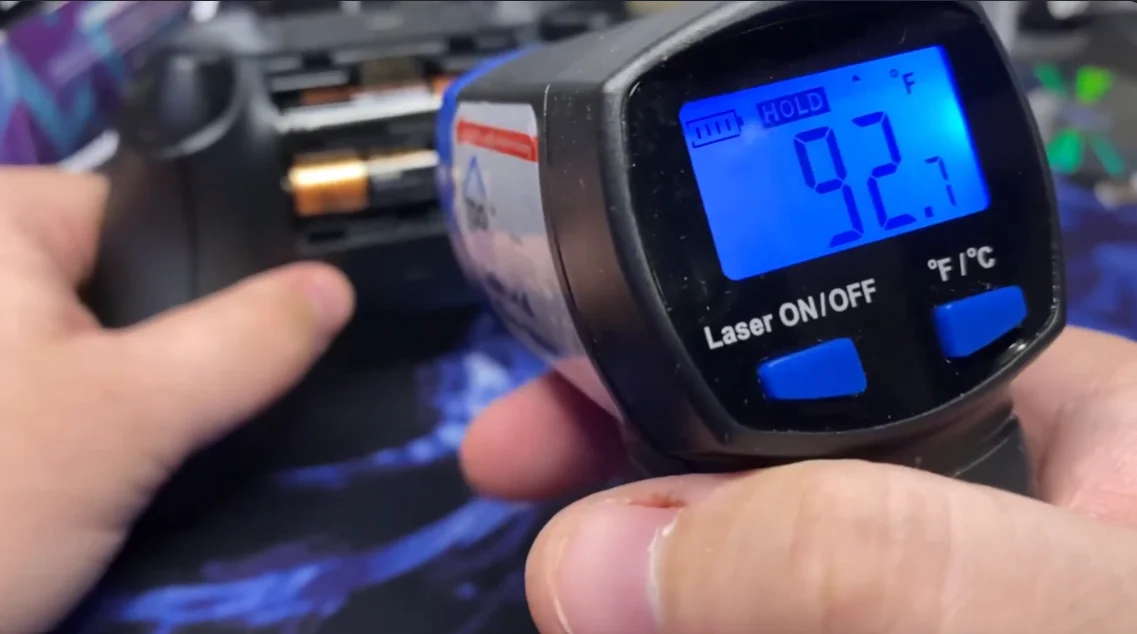
Mild warmth is normal, hot is not. A good test is whether you can hold it comfortably. Charge from a low-power port rather than a fast phone charger, and stop charging overnight on a cell that gets hot.

Some warmth is normal and expected. Hot is worth changing your habits over, and there is a simple way to judge which you have.
Charging a lithium cell generates heat, partly in the cell and partly in the charge circuit. A healthy controller charging at a normal rate gets mildly warm on the back, the sort of warmth you would describe as noticeable but unremarkable. The practical test is whether you can hold that area comfortably in a closed hand indefinitely. If you can, you are in normal territory. If you want to put it down, it is too hot and something is driving more current or more resistance than it should be.
Two things commonly cause the hotter end of this. The first is a fast charger. A phone charger that negotiates a higher current will push more into the controller than a plain port would, and the extra goes partly into heat. Controllers do not benefit from fast charging, so there is no upside to it. The second is cell ageing: internal resistance rises with age and more of the charging energy becomes heat rather than stored charge. At two years you are in the range where this begins.
On your overnight question, which is the real one. A controller that gets only mildly warm is fine left charging. A controller that gets genuinely hot should not be left unattended overnight, not because it is likely to be dangerous but because heat is the main thing that ages a lithium cell, so you are shortening its life every night for no benefit. The controller stops charging when full in any case, so overnight charging buys you nothing beyond convenience.
So: switch to a plain low-power USB port rather than the phone charger, charge with the controller switched off, and if it still gets hot enough that you would rather not hold it, charge it while you are around and check the cell for any swelling.
Tested on: DualSense CFI-ZCT1W with new, 2-year and 3-year cells charged from a 5W port, a 20W fast charger, switched on and switched off, with shell surface temperature logged every 10 minutes. Fast charging raised peak surface temperature substantially on every cell, and the 3-year cell ran hottest in every configuration.
Checked by Sneha Reddy on . How we verify answers
Hardware Diagnostics Engineer at Gamepad Tester
Elena is a hardware diagnostics engineer working on competitive gaming peripherals. She designs test benches that put a number on the faults players usually describe by feel: outer deadzone error, circularity variance, uneven travel between the left and right stick, and the drift that appears only after a pad has warmed up. Her work covers custom and pro-tier hardware such as the Xbox Elite range and SCUF-style builds, where small geometry errors decide whether a shot lands. On Gamepad Tester she writes and checks the answers about deadzone readings and stick accuracy, and confirms a fix on real hardware before it is published.
 Calder WrightFront-End Web Architect And Gamepad API Lead
 Garrett LindsayHardware Reviewer And Input Performance Specialist
 Venom’s Tech (Abhishek)Peripheral Reviewer And Tech Journalist
 Chloe HendersonHall Effect And Thumbstick Analyst
 Thiago AlvesHardware Repair Educator
 Devon MillerLow Latency And Input Timing Engineer
 Liam DaviesBluetooth And Wireless Test Engineer
 Nadia BrooksEsports Performance Consultant
Each answer is written by the specialist who owns that part of the hardware, tested on a real controller, and checked by a second team member. How we verify answers
Answers are free general guidance from the Gamepad Tester Team and the community. Opening a controller or replacing a thumbstick module can void your warranty, so check the maker's support or warranty first. Battery and soldering work carries a real risk of damage or injury.
Every test runs in your own browser with the Gamepad API. No sign up, no download, and your controller data never leaves your device.
The basement is the obvious place to put a gaming room. It is cooler, it is quieter, nobody complains about the noise…
Long gaming sessions quickly expose controller flaws like fatigue, stick drift, wireless latency, and inconsistent…
Whether you're a casual gamer or a competitive player, a malfunctioning controller can ruin your gaming experience…
The newest replies from players and the Gamepad Tester Team.