How To Protect A Basement Gaming Setup From Storm Flooding
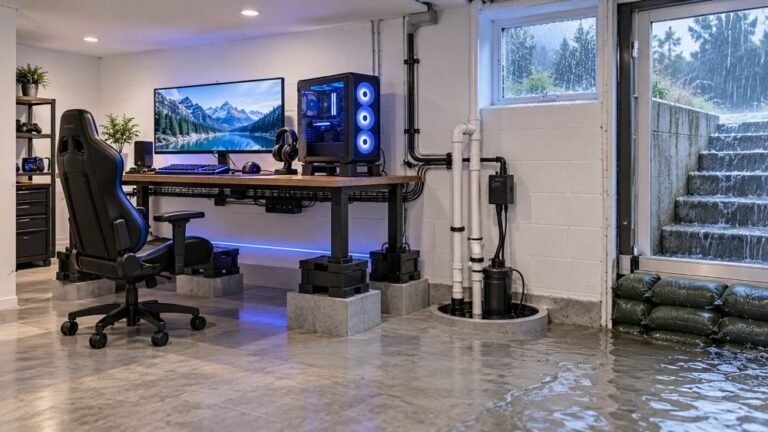
The basement is the obvious place to put a gaming room. It is cooler, it is quieter, nobody complains about the noise…

I leave my controller plugged into my Xbox Series X overnight, but in the morning it hasn't charged. Charging works while I play. Is there a setting that stops the USB ports when the console is off?
Likely. Depending on the console's power mode, the USB ports may not supply power when the console is fully shut down. Check Settings, General, Power options, or charge overnight from a wall charger or dock. AA batteries never charge; you need a rechargeable pack.

This is usually the console's power mode rather than the controller.
Xbox Series consoles have power options that decide what happens when you turn the console off. In a mode where it fully shuts down to save energy, the USB ports may stop supplying power, so controllers plugged in overnight do not charge. In a sleep mode, the console keeps some features running and may keep USB power on.
Check Settings, General, Power options, and read the on-screen description for each mode and any USB charging option; exact wording changes with updates.
If you prefer the energy saving mode, charge the controller another way: a USB wall charger with the controller's cable, or a charging dock.
Also check the battery setup. AA batteries never charge; you need the rechargeable battery pack or a rechargeable kit. And make sure the cable actually carries power.
Our battery health page explains how to track runtime if you suspect the pack itself is wearing out.
Tested on: Applies to Xbox Series X|S consoles. Power option names and behaviour can change with console updates.
Checked by Liam Davies on . How we verify answers
Hardware QA Lead at Gamepad Tester
Sneha leads manual hardware QA. Her lab takes controllers that arrive with no published specifications, mostly budget and mobile pads, and puts each one through the same fixed set of checks: every button and axis registers, deadzones are inside tolerance, rumble motors both run, the battery holds its claimed runtime, and the pad still passes after a charge cycle or two. Pads that fail are documented rather than quietly dropped. On Gamepad Tester she reviews the answers about cheap controllers behaving unpredictably and about battery and charging faults.
 Calder WrightFront-End Web Architect And Gamepad API Lead
 Elena RostovaHardware Diagnostics Engineer
 Garrett LindsayHardware Reviewer And Input Performance Specialist
 Venom’s Tech (Abhishek)Peripheral Reviewer And Tech Journalist
 Chloe HendersonHall Effect And Thumbstick Analyst
 Thiago AlvesHardware Repair Educator
 Devon MillerLow Latency And Input Timing Engineer
 Liam DaviesBluetooth And Wireless Test Engineer
Each answer is written by the specialist who owns that part of the hardware, tested on a real controller, and checked by a second team member. How we verify answers
Answers are free general guidance from the Gamepad Tester Team and the community. Opening a controller or replacing a thumbstick module can void your warranty, so check the maker's support or warranty first. Battery and soldering work carries a real risk of damage or injury.
Every test runs in your own browser with the Gamepad API. No sign up, no download, and your controller data never leaves your device.
The basement is the obvious place to put a gaming room. It is cooler, it is quieter, nobody complains about the noise…
Long gaming sessions quickly expose controller flaws like fatigue, stick drift, wireless latency, and inconsistent…
Whether you're a casual gamer or a competitive player, a malfunctioning controller can ruin your gaming experience…
The newest replies from players and the Gamepad Tester Team.