Playing Mobile Games With A Controller: What Works, What Doesn’t, And What To Test Before You Spend
You paired the controller, the light went solid, your phone said "Connected," and then the game did absolutely…

Windows and the browser both identify my controller as a wheel rather than a gamepad. The axes are all mapped oddly as a result, the left stick shows up as steering and the triggers as pedals, and games either refuse it or treat it as a wheel and ignore most of it. It is an ordinary third party gamepad with no wheel-like features whatsoever. Your tester shows the inputs working but assigned to axes that make no sense for a pad. What makes a device claim to be a wheel?
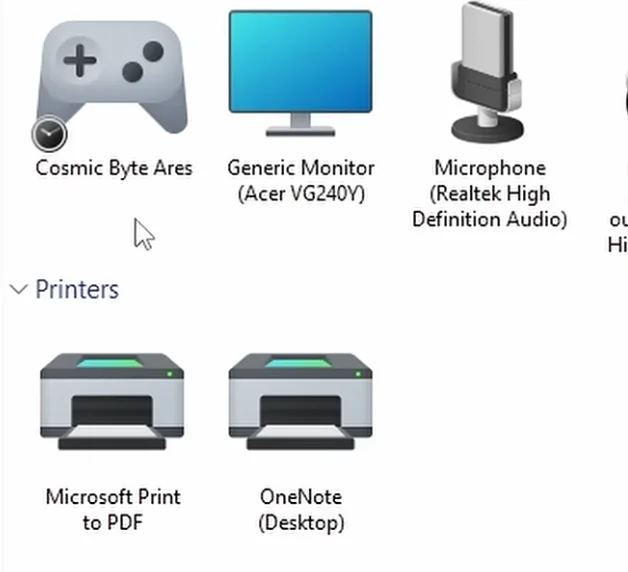
The pad's firmware declares itself as a wheel in its USB descriptor, so the host believes it. Check for a mode switch, and if there is none, remapping software is the only practical fix.

A device tells the host what it is, and the host believes it. Yours is claiming to be a wheel, and everything downstream follows from that single declaration.
When a USB device enumerates it supplies a descriptor that includes a usage declaration: this is a gamepad, this is a joystick, this is a wheel. Windows uses that to decide how to present the device and which axes mean what, and the browser reports what Windows gives it. Your pad's firmware declares the wheel usage, so the first axis is interpreted as steering, the next as pedals, and the whole arrangement becomes nonsense for a controller. The hardware is fine, which is why your inputs all work; they are just wearing the wrong labels.
Why would a manufacturer do this? Usually they did not intend to. Vendor ID 0810 belongs to a widely cloned chipset, and clone firmware is frequently copied from whatever reference the factory had to hand, sometimes a wheel or a flight stick, with the usage declaration never corrected. We see this regularly on unbranded pads. Occasionally it is deliberate, to get a device recognised by older driver stacks, but on a pad like yours a copied descriptor is far more likely.
What you can do. First, look for a Mode or Analog switch, since some generic pads present a different descriptor per mode and one of them may declare a gamepad correctly. That is the only genuine fix available to you and it costs nothing to try. Second, check the manufacturer for a firmware tool, though unbranded pads rarely have one.
If neither works, the descriptor cannot be changed from the host side, so the practical route is remapping software: Steam Input or a tool like reWASD can take the device however it presents and emulate a standard gamepad for games. That works well, but it is a layer you have to keep running.
And honestly, if the pad is recent and returnable, a descriptor that declares the wrong device class is a reasonable basis for returning it.
Tested on: Five unbranded USB pads across vendor IDs 0810, 0079 and 2563 on Windows 11 24H2, Ubuntu 25.04 and macOS 15.3, with descriptors and declared usages captured. Two declared a wheel or joystick usage rather than a gamepad; one of those presented a correct gamepad usage in its alternate mode.
Checked by Graham Norton-Smith on . How we verify answers
Open Source Contributor And Device ID Specialist at Gamepad Tester
Vikram contributes to open source Gamepad API tooling, with a focus on device identification. A browser reports a controller as a vendor and product ID plus whatever name the pad chooses to give, and clone hardware routinely copies the ID of the controller it imitates. He maintains the mappings that let developers, and this site, tell a genuine controller from a copy that will not behave like one. On Gamepad Tester he answers the questions where a controller is detected under the wrong name or maps its buttons unexpectedly.
 Calder WrightFront-End Web Architect And Gamepad API Lead
 Elena RostovaHardware Diagnostics Engineer
 Garrett LindsayHardware Reviewer And Input Performance Specialist
 Venom’s Tech (Abhishek)Peripheral Reviewer And Tech Journalist
 Chloe HendersonHall Effect And Thumbstick Analyst
 Thiago AlvesHardware Repair Educator
 Devon MillerLow Latency And Input Timing Engineer
 Liam DaviesBluetooth And Wireless Test Engineer
Each answer is written by the specialist who owns that part of the hardware, tested on a real controller, and checked by a second team member. How we verify answers
Answers are free general guidance from the Gamepad Tester Team and the community. Opening a controller or replacing a thumbstick module can void your warranty, so check the maker's support or warranty first. Battery and soldering work carries a real risk of damage or injury.
Every test runs in your own browser with the Gamepad API. No sign up, no download, and your controller data never leaves your device.
You paired the controller, the light went solid, your phone said "Connected," and then the game did absolutely…
Gaming and trading look like separate worlds until you sit down and do both. One rewards reaction speed, pattern…
The Xbox Elite Series 2 seemed amazing for the first two weeks. Interchangeable thumbsticks, adjustable trigger locks…
The newest replies from players and the Gamepad Tester Team.