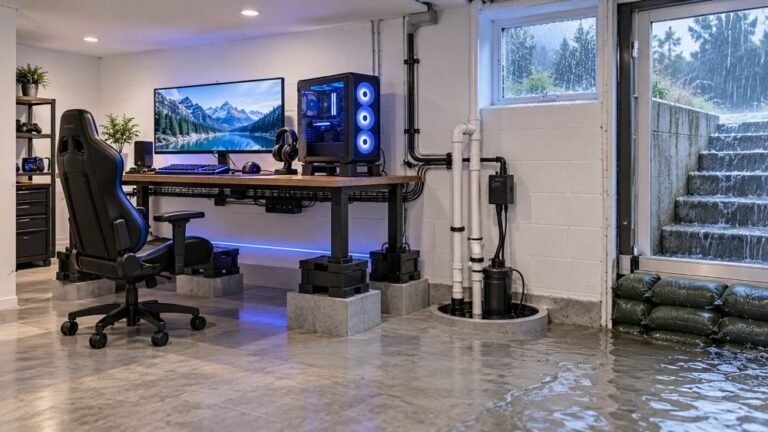
How To Protect A Basement Gaming Setup From Storm Flooding
The basement is the obvious place to put a gaming room. It is cooler, it is quieter, nobody complains about the noise…

Every so often my Xbox Series controller just turns off in the middle of a game on my PC over Bluetooth. Xbox button goes dark. I press it and it reconnects. Batteries are not new but not dead either. Is it the controller dying?
The most common cause is weak AA batteries: Xbox controllers can shut down under load well before the battery warning appears. Fresh batteries or a fully charged pack fix most cases. If not, check for a firmware update and Bluetooth power saving.

Before anything else, try fresh batteries. It sounds too simple, but it is the most common cause. Xbox controllers draw more current during rumble, and partly used AA batteries can sag enough under that load to brown out the controller, even when the battery indicator says they are fine. Rechargeable NiMH cells also have a lower voltage than alkalines, and older ones drop off quickly.
If fresh alkalines or a fully charged pack stop it, you have your answer. If not, there are two other causes.
The battery contacts. The springs and contacts in the battery compartment can loosen or corrode, so a small knock interrupts power. Look for corrosion and make sure the batteries sit firmly.
The Bluetooth link. A dropped connection usually leaves the controller searching with a flashing Xbox button, not fully off, but Windows power saving on the Bluetooth adapter can cause odd drops. Updating the controller firmware through the Xbox Accessories app and turning off power saving on the adapter rules that out.
The connection stability test logs each drop with a time, which helps you see whether shutdowns line up with heavy rumble moments.
Tested on: Applies to Xbox Wireless Controller Model 1914 over Bluetooth on Windows 11 with Edge or Chrome. Firmware steps per Xbox support's update guide.
Checked by Devon Miller on . How we verify answers
Bluetooth And Wireless Test Engineer at Gamepad Tester
Liam works on Bluetooth Low Energy and wireless input. Most pairing complaints are not really pairing problems: they are packet drops, signal jitter or interference from a crowded 2.4GHz band, and they look completely different on a trace than they do to the player. He tests how controllers behave over distance, through walls, alongside other wireless devices, and on the proprietary dongles that several brands ship. On Gamepad Tester he answers the pairing and dropout questions and verifies fixes over both Bluetooth and adapter connections.
 Calder WrightFront-End Web Architect And Gamepad API Lead
 Elena RostovaHardware Diagnostics Engineer
 Garrett LindsayHardware Reviewer And Input Performance Specialist
 Venom’s Tech (Abhishek)Peripheral Reviewer And Tech Journalist
 Chloe HendersonHall Effect And Thumbstick Analyst
 Thiago AlvesHardware Repair Educator
 Devon MillerLow Latency And Input Timing Engineer
 Nadia BrooksEsports Performance Consultant
Each answer is written by the specialist who owns that part of the hardware, tested on a real controller, and checked by a second team member. How we verify answers
Answers are free general guidance from the Gamepad Tester Team and the community. Opening a controller or replacing a thumbstick module can void your warranty, so check the maker's support or warranty first. Battery and soldering work carries a real risk of damage or injury.
Every test runs in your own browser with the Gamepad API. No sign up, no download, and your controller data never leaves your device.
The basement is the obvious place to put a gaming room. It is cooler, it is quieter, nobody complains about the noise…
Long gaming sessions quickly expose controller flaws like fatigue, stick drift, wireless latency, and inconsistent…
Whether you're a casual gamer or a competitive player, a malfunctioning controller can ruin your gaming experience…
The newest replies from players and the Gamepad Tester Team.