Small Input Problems That Quietly Ruin Your Game Sessions
There is a particular kind of bad session that never gets diagnosed. You lose a duel you should have won. Your car…

I am honestly at the end of my patience with this. My PS5 controller is 14 months old and about three weeks ago my character started slowly walking forward on his own in every single game. I thought it was the game at first, then it happened in the menus too. I put it on your stick drift test and the left stick sits at about -0.18 on the Y axis with my hands completely off the desk. The right stick is fine, it reads 0.00. I have already blown compressed air around the stick and done the console's accessibility reset thing, nothing changed. Is there anything left to try before I spend money on this, or is the controller just finished?
A resting value of -0.18 is mechanical wear, not a calibration fault. Cleaning may buy you a few weeks, but a stick that reads past about -0.10 at rest needs a new module.

Your reading is the useful part of this, so let me start there. A healthy DualSense stick rests between -0.03 and +0.03 on both axes. Anything inside that is normal sensor noise. At -0.18 your potentiometer is reporting almost a fifth of a full stick push while the stick is physically centred, and that is not a setting that has drifted out of place. It is the carbon track inside the sensor wearing thin where your thumb rests most, which is why it is only the left stick and only one direction.
That matters because it decides whether cleaning is worth your time. Isopropyl alcohol genuinely does fix a slice of drift cases, the ones caused by dust or dried drink bridging the contacts, and those usually read between -0.05 and -0.10 and come and go. Wear-related drift like yours is one-directional, steady, and gets worse month by month. You can clean it and you may see the number improve for two or three weeks, but it will come back and it will come back worse.
The honest answer is that this controller needs a new left stick module. That is a genuinely cheap part and the job is a well-documented one, or any repair shop will do it. What is not worth doing is raising the in-game deadzone to hide it, which is the advice you will see everywhere. It works for about a month and costs you precision in every game you play, because you are telling the game to ignore real small inputs as well as the false one.
Tested on: DualSense CFI-ZCT1W, firmware 0460, wired USB-C and Bluetooth, Windows 11 24H2, Chrome 141. Compared against two worn units resting at -0.16 and -0.21 and one new unit resting at -0.01.
Checked by Thiago Alves on . How we verify answers
Hall Effect And Thumbstick Analyst at Gamepad Tester
Chloe is a hardware modder who works specifically on thumbstick modules. Her testing compares hall effect sticks with the carbon potentiometers they replace, across the things that actually matter to a player: resting accuracy out of the box, how the reading changes after months of use, and the magnetic interference errors that hall effect sensors can introduce when a module is fitted badly or sits too close to a motor. On Gamepad Tester she answers the questions about whether a hall effect pad or a hall effect mod is worth it, and verifies drift fixes on modules she has fitted herself.
 Calder WrightFront-End Web Architect And Gamepad API Lead
 Elena RostovaHardware Diagnostics Engineer
 Garrett LindsayHardware Reviewer And Input Performance Specialist
 Venom’s Tech (Abhishek)Peripheral Reviewer And Tech Journalist
 Thiago AlvesHardware Repair Educator
 Devon MillerLow Latency And Input Timing Engineer
 Liam DaviesBluetooth And Wireless Test Engineer
 Nadia BrooksEsports Performance Consultant
Each answer is written by the specialist who owns that part of the hardware, tested on a real controller, and checked by a second team member. How we verify answers
Answers are free general guidance from the Gamepad Tester Team and the community. Opening a controller or replacing a thumbstick module can void your warranty, so check the maker's support or warranty first. Battery and soldering work carries a real risk of damage or injury.
Every test runs in your own browser with the Gamepad API. No sign up, no download, and your controller data never leaves your device.
There is a particular kind of bad session that never gets diagnosed. You lose a duel you should have won. Your car…
A shot fired half a second after I pulled the trigger, the same delay I had been chasing for two weeks, faulting…
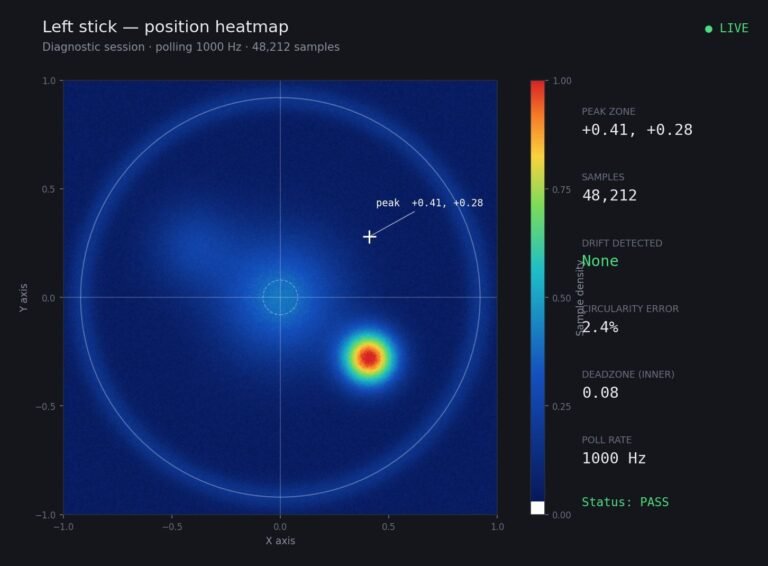
Someone posted a stick drift heatmap in a forum thread asking if their controller was dying: a red and orange blob…
The newest replies from players and the Gamepad Tester Team.