Repairing Ghost Inputs Caused by Worn Carbon Pads
The face button registered a press I never made, a phantom input firing on its own during a menu screen while my thumb…

L3 is dead. Push the stick in and nothing. The stick itself moves perfectly, drift is fine, deadzone is fine, but the Left Stick Click does nothing on your thumbstick click test. R3 clicks fine. It means I cannot sprint in half my games without remapping. Controller is just over two years old. I assume this is a switch under the stick but I wanted to confirm before I open it, and I would like to know if it is a separate part or if I have to replace the whole stick module.

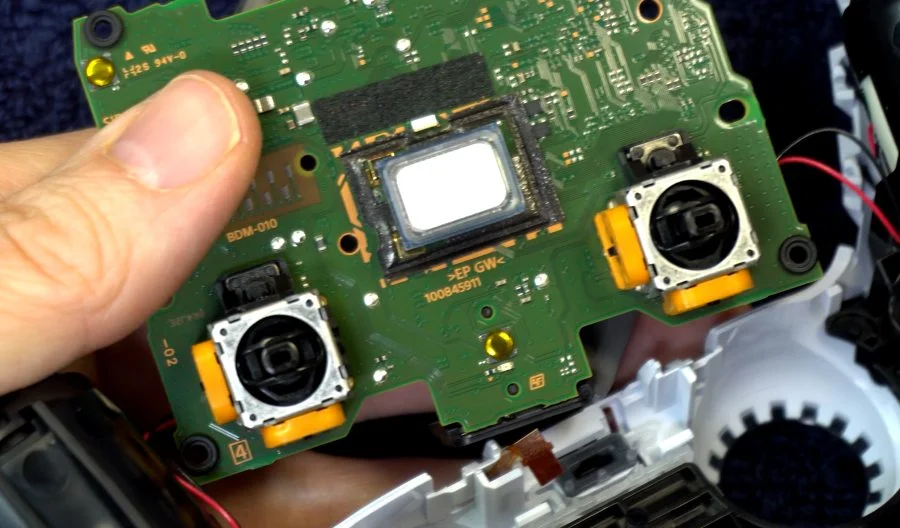
It is the click switch built into the stick module, not a separate part. On a DualSense that means a module replacement, which is the same job as a drift repair and no harder.

You have diagnosed it correctly and I can save you the disappointment of opening it up hoping for a separate switch.
On a DualSense, the stick click is a small tactile switch built into the base of the stick module itself. It is not a discrete part sitting on the board that you can swap on its own, so a dead L3 means a module replacement. The upside is that this is exactly the same repair as a drift fix: same module, same part number, same price, same procedure. If you have ever read a stick drift repair guide for this controller, you already know the job.
It is worth understanding why this fails independently of the stick's analog function, because it reassures you that the rest of the module is irrelevant to the diagnosis. The click switch and the two potentiometers are separate mechanisms inside one assembly. Your potentiometers are clearly healthy, since your drift and deadzone readings are good. The click switch is a dome contact that takes the full force of your thumb pushing down, and after two years of sprinting it has either worn through or its dome has collapsed. Nothing you do to the analog side affects it.
One thing worth doing first, because it is free and occasionally works: the switch can be held open by debris or by dried drink that has run down the stick shaft. A few drops of isopropyl alcohol into the stick base, then click it forty or fifty times to work it through, sometimes revives a switch that is contaminated rather than worn. It is a long shot at two years of use, but it costs ten minutes and the module will still be there afterwards.
And a practical note while you wait for the part: remapping sprint to a rear paddle or to Circle is a perfectly reasonable interim fix and most games allow it.
Tested on: DualSense CFI-ZCT1W across two hardware revisions, wired USB-C, Windows 11 24H2, Chrome 141 and Firefox 144. One dead L3 revived by alcohol flushing, two required module replacement. Post-replacement click registered 20 of 20 on each.
Checked by Thiago Alves on . How we verify answers
Hall Effect And Thumbstick Analyst at Gamepad Tester
Chloe is a hardware modder who works specifically on thumbstick modules. Her testing compares hall effect sticks with the carbon potentiometers they replace, across the things that actually matter to a player: resting accuracy out of the box, how the reading changes after months of use, and the magnetic interference errors that hall effect sensors can introduce when a module is fitted badly or sits too close to a motor. On Gamepad Tester she answers the questions about whether a hall effect pad or a hall effect mod is worth it, and verifies drift fixes on modules she has fitted herself.
 Calder WrightFront-End Web Architect And Gamepad API Lead
 Elena RostovaHardware Diagnostics Engineer
 Garrett LindsayHardware Reviewer And Input Performance Specialist
 Venom’s Tech (Abhishek)Peripheral Reviewer And Tech Journalist
 Thiago AlvesHardware Repair Educator
 Devon MillerLow Latency And Input Timing Engineer
 Liam DaviesBluetooth And Wireless Test Engineer
 Nadia BrooksEsports Performance Consultant
Each answer is written by the specialist who owns that part of the hardware, tested on a real controller, and checked by a second team member. How we verify answers
Answers are free general guidance from the Gamepad Tester Team and the community. Opening a controller or replacing a thumbstick module can void your warranty, so check the maker's support or warranty first. Battery and soldering work carries a real risk of damage or injury.
Every test runs in your own browser with the Gamepad API. No sign up, no download, and your controller data never leaves your device.
The face button registered a press I never made, a phantom input firing on its own during a menu screen while my thumb…
Android RPGs no longer feel like small games made to fill a few spare minutes. Some now offer large open worlds…
Esports viewing has changed a lot. Fans no longer watch only for big kills, clutch rounds, final scores, or highlight…
The newest replies from players and the Gamepad Tester Team.