How Well Do Console Games Really Translate To Mobile Gaming?
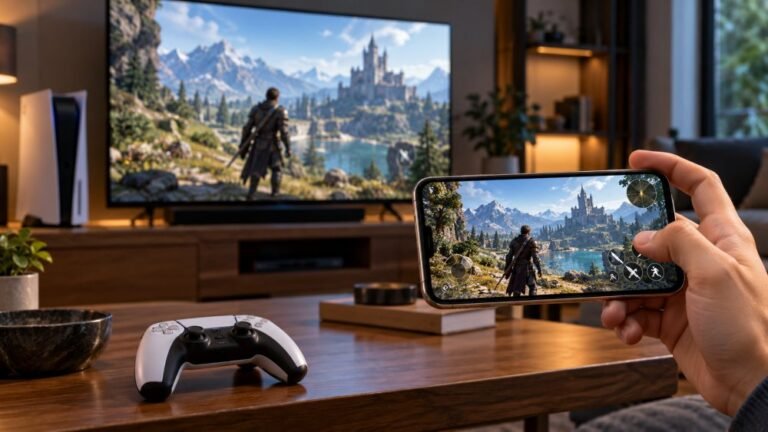
Mobile gaming has become an increasingly popular way to enjoy video games, with smartphones now capable of running…

I'm trying Xbox Cloud Gaming on my Android phone. Some games show on-screen touch controls, others ask me to connect a controller. Is a controller worth it, and which games work with touch?
Only some cloud games include touch control layouts; most expect a controller. A Bluetooth controller works with far more games and is more precise. Use touch for casual games that support it, and a controller, ideally with a phone clip, for everything else.

Touch controls are a bonus on selected games; a controller is the standard way to play.
Touch. Some cloud games come with custom touch layouts designed for phones. In others, a generic on-screen gamepad appears. Touch works for slower games, menus and short sessions, but covers part of the screen and is less precise for shooters and racing.
Controller. A Bluetooth controller works with nearly every game in the cloud library, gives proper analog control and keeps the screen clear. Xbox Wireless Controllers with Bluetooth and the DualSense work on Android and iPhone.
What helps:
A phone clip or a clip-on controller makes holding everything comfortable.
Check the game's tile: the cloud library indicates whether a game supports touch.
Before a long session, pair the controller and check it in our gamepad tester in Chrome on the phone.
Use strong 5GHz Wi-Fi; mobile data works but varies.
If you mostly play casually on the go, touch games can be enough; for anything competitive, a controller is worth it.
Tested on: Applies to Xbox Cloud Gaming on Android 16 and iOS phones. Library and touch support vary by game.
Checked by Chris Evans Jr. on . How we verify answers
Mobile And WebView Compatibility Engineer at Gamepad Tester
Priya works on WebView compatibility. A large share of mobile traffic reaches a page from inside another app's embedded browser, where viewport sizing, permissions and input handling all differ from the standalone browser on the same phone. She tests how the tools scale and behave inside Android WebView containers so a player who opens a test from a link in a chat app is not handed a broken layout or a controller the page cannot see. On Gamepad Tester she reviews the mobile tooling answers.
 Calder WrightFront-End Web Architect And Gamepad API Lead
 Elena RostovaHardware Diagnostics Engineer
 Garrett LindsayHardware Reviewer And Input Performance Specialist
 Venom’s Tech (Abhishek)Peripheral Reviewer And Tech Journalist
 Chloe HendersonHall Effect And Thumbstick Analyst
 Thiago AlvesHardware Repair Educator
 Devon MillerLow Latency And Input Timing Engineer
 Liam DaviesBluetooth And Wireless Test Engineer
Each answer is written by the specialist who owns that part of the hardware, tested on a real controller, and checked by a second team member. How we verify answers
Answers are free general guidance from the Gamepad Tester Team and the community. Opening a controller or replacing a thumbstick module can void your warranty, so check the maker's support or warranty first. Battery and soldering work carries a real risk of damage or injury.
Every test runs in your own browser with the Gamepad API. No sign up, no download, and your controller data never leaves your device.
Mobile gaming has become an increasingly popular way to enjoy video games, with smartphones now capable of running…
There is a particular kind of bad session that never gets diagnosed. You lose a duel you should have won. Your car…
Gaming does not always have to be complicated. Many players enjoy games that are easy to pick up and fun to play…
The newest replies from players and the Gamepad Tester Team.