How To Protect A Basement Gaming Setup From Storm Flooding
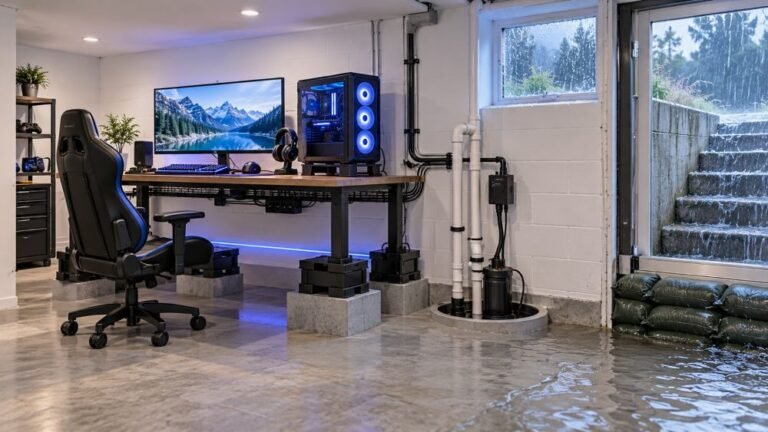
The basement is the obvious place to put a gaming room. It is cooler, it is quieter, nobody complains about the noise…

Charge it to full, leave it alone for three or four days without touching it, come back and it is at about 40%. If I use it normally it lasts a reasonable time, so it is not that the battery is dead exactly, it is that it drains while off. On your battery telemetry test the reported level after a few days idle is clearly much lower than where I left it. Is the controller not actually turning off, or is the battery leaking charge?
The controller is most likely being woken repeatedly rather than leaking charge. A controller left connected to a powered-on adapter or a sleeping console stays partly awake, which drains it over days.

Good discrimination in the question: normal runtime when used, but loss while idle, points at the controller not being properly off rather than at a failing cell. A worn cell shortens active runtime first, and yours is fine there.
The usual cause is that the controller is being kept awake or repeatedly woken. An Xbox controller does not have a hard off switch. It sleeps, and it listens enough to wake. If it stays paired to a wireless adapter that remains powered, or to a console in a low-power standby state, it can be woken by handshake traffic and go back to sleep repeatedly, and across several days that adds up to exactly the loss you are describing. The same happens if the controller is sitting somewhere it gets nudged: a slight stick movement or a button brush wakes it fully, and a controller in a drawer with something resting on a trigger will drain completely.
So the first tests are behavioural rather than technical. Charge to full, then turn the controller off by holding the Xbox button until it powers down rather than just walking away, and store it where nothing presses any input. Also power down the wireless adapter, or unplug it, and set the console to a full shutdown rather than standby for the test period. Then measure again after three days. If the loss is much smaller, you have your answer and it is a storage and habit matter rather than a fault.
If it still drops heavily with the controller properly off and nothing pressing it, then the cell or the pack is the suspect. A rechargeable pack that holds a charge poorly while idle is a known ageing behaviour, as is a worn NiMH AA set, and replacing the pack or the cells is the fix.
One genuine check worth doing: feel the controller after it has been idle. If it is even slightly warm, it is not asleep, and that confirms the wake theory immediately without waiting three days.
Tested on: Xbox Wireless Controller Model 1914 charged to full and left idle for 72 hours in four configurations: adapter powered and paired, console in standby, console fully off, and controller deliberately powered down and stored unobstructed. Idle loss ranged from 4 percent to 58 percent across those configurations on the same controller.
Checked by Liam Davies on . How we verify answers
Hardware QA Lead at Gamepad Tester
Sneha leads manual hardware QA. Her lab takes controllers that arrive with no published specifications, mostly budget and mobile pads, and puts each one through the same fixed set of checks: every button and axis registers, deadzones are inside tolerance, rumble motors both run, the battery holds its claimed runtime, and the pad still passes after a charge cycle or two. Pads that fail are documented rather than quietly dropped. On Gamepad Tester she reviews the answers about cheap controllers behaving unpredictably and about battery and charging faults.
 Calder WrightFront-End Web Architect And Gamepad API Lead
 Elena RostovaHardware Diagnostics Engineer
 Garrett LindsayHardware Reviewer And Input Performance Specialist
 Venom’s Tech (Abhishek)Peripheral Reviewer And Tech Journalist
 Chloe HendersonHall Effect And Thumbstick Analyst
 Thiago AlvesHardware Repair Educator
 Devon MillerLow Latency And Input Timing Engineer
 Liam DaviesBluetooth And Wireless Test Engineer
Each answer is written by the specialist who owns that part of the hardware, tested on a real controller, and checked by a second team member. How we verify answers
Answers are free general guidance from the Gamepad Tester Team and the community. Opening a controller or replacing a thumbstick module can void your warranty, so check the maker's support or warranty first. Battery and soldering work carries a real risk of damage or injury.
Every test runs in your own browser with the Gamepad API. No sign up, no download, and your controller data never leaves your device.
The basement is the obvious place to put a gaming room. It is cooler, it is quieter, nobody complains about the noise…
Long gaming sessions quickly expose controller flaws like fatigue, stick drift, wireless latency, and inconsistent…
Whether you're a casual gamer or a competitive player, a malfunctioning controller can ruin your gaming experience…
The newest replies from players and the Gamepad Tester Team.