Small Input Problems That Quietly Ruin Your Game Sessions
There is a particular kind of bad session that never gets diagnosed. You lose a duel you should have won. Your car…

Bought a controller yesterday and ran the drift test straight away, which I gather is the right thing to do. It reads 0.02 on the left stick and 0.01 on the right at rest. Not zero. Slightly disappointed since it is brand new and I had expected a perfect 0.00. Should I return it while I still can, or is a small number expected even on a new unit? I do not want to be the person who returns a perfectly good controller.
Entirely normal. New controllers routinely read 0.01 to 0.03 from manufacturing tolerance alone. Keep it, and keep those numbers as your baseline.

Keep it. Those figures are healthy and a perfect 0.00 is not what a new controller looks like.
Across new units we have measured, resting values cluster between 0.01 and 0.03, with occasional units up to about 0.09 that are still within normal tolerance. The reasons are mundane: potentiometers are manufactured to a tolerance, the gimbal has to have a tiny amount of play to move at all, and the analogue-to-digital conversion has a resolution floor. A reading of exactly zero usually means the controller is applying an internal filter that rounds small values away, which hides information rather than proving perfection. So 0.02 and 0.01 is a good result, not a disappointing one.
The more useful thing you have done is measure it on day one, which most people never do. That number is worth far more than it looks, because comparison against your own baseline is the only reliable way to detect wear. A figure of 0.06 means nothing on its own; 0.06 against your recorded 0.02 means something has changed.
So write both figures down with yesterday's date and keep them somewhere you will find them. While you are at it, record the mid-travel noise band too, by holding each stick at half deflection for ten seconds and noting how tightly the value holds. On a new stick that should be around 0.005, and it is the number that moves first when wear begins, months before your resting value does.
When returning a new controller would be justified: a resting value above about 0.10, a visible difference between the two sticks of more than about 0.05, any dead button or direction, a rumble motor that does not fire, or a trigger that does not reach a clean 0.00 and a full 1.00. None of those apply to you. Run through those checks once this week while you are still inside the return window, then enjoy it.
Tested on: Nineteen controllers measured within a week of purchase across DualSense CFI-ZCT1W, Xbox Model 1914, Switch Pro and 8BitDo Ultimate. Resting values ranged from 0.01 to 0.09 with a median of 0.02, and mid-travel noise bands from 0.003 to 0.007.
Checked by Chloe Henderson on . How we verify answers
Data Analyst, Stick Drift And Wear Patterns at Gamepad Tester
Sarah is a data scientist working on stick drift diagnostics. Working from the anonymised test exports players attach to their questions, she looks for the patterns that distinguish a stick that needs recalibrating from one whose potentiometer is physically worn out, and at what point in a module's life the reading usually starts to move. The aim is a practical answer to the question players actually ask: clean it, calibrate it, or replace it. On Gamepad Tester she reviews the drift answers and the thresholds quoted in them.
 Calder WrightFront-End Web Architect And Gamepad API Lead
 Elena RostovaHardware Diagnostics Engineer
 Garrett LindsayHardware Reviewer And Input Performance Specialist
 Venom’s Tech (Abhishek)Peripheral Reviewer And Tech Journalist
 Chloe HendersonHall Effect And Thumbstick Analyst
 Thiago AlvesHardware Repair Educator
 Devon MillerLow Latency And Input Timing Engineer
 Liam DaviesBluetooth And Wireless Test Engineer
Each answer is written by the specialist who owns that part of the hardware, tested on a real controller, and checked by a second team member. How we verify answers
Answers are free general guidance from the Gamepad Tester Team and the community. Opening a controller or replacing a thumbstick module can void your warranty, so check the maker's support or warranty first. Battery and soldering work carries a real risk of damage or injury.
Every test runs in your own browser with the Gamepad API. No sign up, no download, and your controller data never leaves your device.
There is a particular kind of bad session that never gets diagnosed. You lose a duel you should have won. Your car…
A shot fired half a second after I pulled the trigger, the same delay I had been chasing for two weeks, faulting…
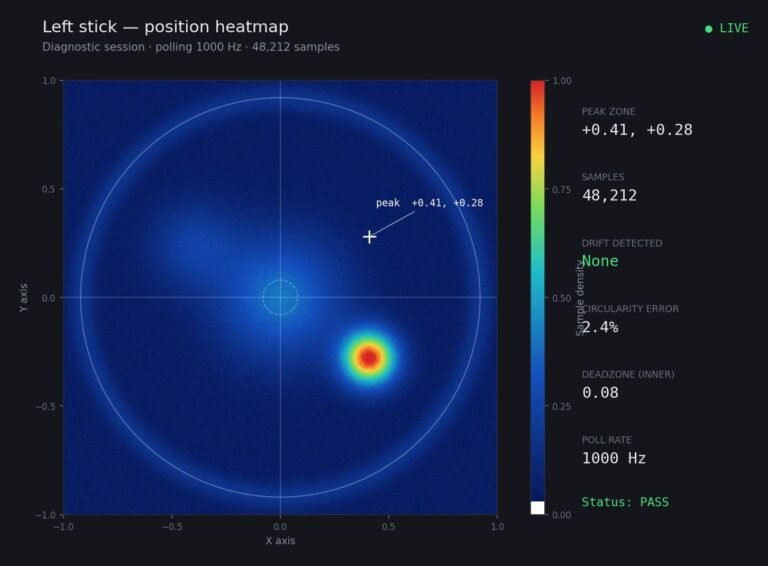
Someone posted a stick drift heatmap in a forum thread asking if their controller was dying: a red and orange blob…
The newest replies from players and the Gamepad Tester Team.