Small Input Problems That Quietly Ruin Your Game Sessions
There is a particular kind of bad session that never gets diagnosed. You lose a duel you should have won. Your car…

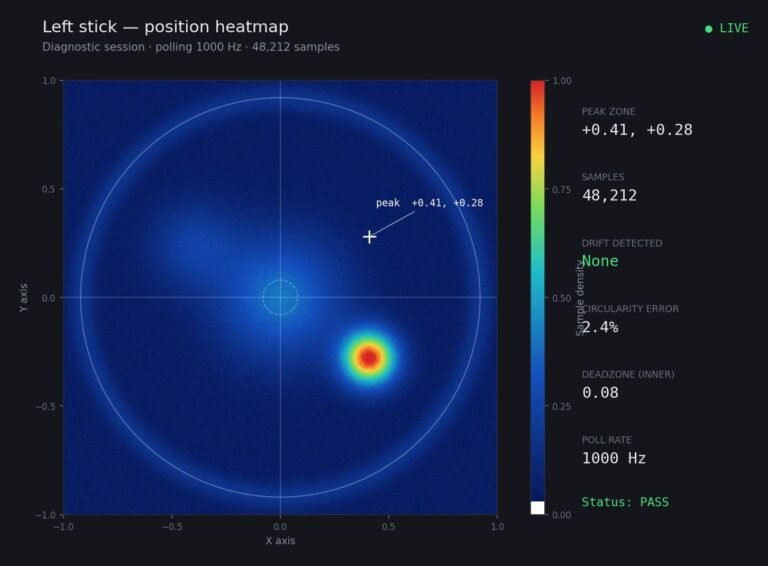
Stick Noise measures 0.04 at rest with a bit of flicker. Raising my in-game deadzone to 7 removes the problem but I lose the fine aim I rely on for long range shots, which is exactly the thing I care about most. Is there a middle option? I had read something about response curves but I do not really understand what they do differently from a deadzone. Would rather not replace a stick that is otherwise fine.
Yes. A response curve reduces sensitivity near centre instead of ignoring it, so small real inputs still work while noise produces almost nothing. That is the middle option you want.

There is a middle option and you have already found its name. The difference between a deadzone and a curve is worth understanding properly, because it is exactly the distinction your problem turns on.
A deadzone is a cliff. Everything below the threshold is discarded entirely. Set it to 7 and your stick does literally nothing until you pass 7, which removes your 0.04 noise and also removes every genuine input between 0 and 7. That is why your long range aim suffers: fine aim lives in that range.
A response curve is a slope. Instead of discarding small inputs it reduces how much effect they have, with the reduction strongest near centre and tapering off as you push further. Your 0.04 of noise still gets through but produces almost no movement, because at that part of the curve the output is a tiny fraction of the input. Meanwhile a deliberate small push of 0.10 still moves your aim, just less than it would on a linear curve, which for long range aim is usually what you want anyway.
So a curve suits your situation better than a deadzone does, and many competitive players use a small curve with a minimal deadzone for exactly this reason.
In practice: set your in-game deadzone low, around your measured 0.04 or just above at 5, so genuine inputs survive, then apply a moderate curve, often called exponential, or a sensitivity multiplier near centre, or in some games simply a response curve slider. Steam Input can apply a curve if the game does not expose one. Then tune by feel over a session rather than in one sitting.
One honest caveat. A curve manages noise; it does not fix a worn stick. At 0.04 with flicker you are early in wear rather than at the end, so this is a legitimate solution for now. Keep measuring, and when the resting value passes about 0.10 no curve will save it and the module needs replacing.
Tested on: DualSense CFI-ZCT1W with a measured 0.04 resting value and visible flicker, compared across a 7 percent deadzone with linear response, a 5 percent deadzone with a moderate curve, and a linear baseline, in three PC titles. The curve configuration eliminated perceptible noise-driven drift while retaining usable input below 7 percent stick deflection.
Checked by Nadia Brooks on . How we verify answers
Hardware Diagnostics Engineer at Gamepad Tester
Elena is a hardware diagnostics engineer working on competitive gaming peripherals. She designs test benches that put a number on the faults players usually describe by feel: outer deadzone error, circularity variance, uneven travel between the left and right stick, and the drift that appears only after a pad has warmed up. Her work covers custom and pro-tier hardware such as the Xbox Elite range and SCUF-style builds, where small geometry errors decide whether a shot lands. On Gamepad Tester she writes and checks the answers about deadzone readings and stick accuracy, and confirms a fix on real hardware before it is published.
 Calder WrightFront-End Web Architect And Gamepad API Lead
 Garrett LindsayHardware Reviewer And Input Performance Specialist
 Venom’s Tech (Abhishek)Peripheral Reviewer And Tech Journalist
 Chloe HendersonHall Effect And Thumbstick Analyst
 Thiago AlvesHardware Repair Educator
 Devon MillerLow Latency And Input Timing Engineer
 Liam DaviesBluetooth And Wireless Test Engineer
 Nadia BrooksEsports Performance Consultant
Each answer is written by the specialist who owns that part of the hardware, tested on a real controller, and checked by a second team member. How we verify answers
Answers are free general guidance from the Gamepad Tester Team and the community. Opening a controller or replacing a thumbstick module can void your warranty, so check the maker's support or warranty first. Battery and soldering work carries a real risk of damage or injury.
Every test runs in your own browser with the Gamepad API. No sign up, no download, and your controller data never leaves your device.
There is a particular kind of bad session that never gets diagnosed. You lose a duel you should have won. Your car…
A shot fired half a second after I pulled the trigger, the same delay I had been chasing for two weeks, faulting…
Someone posted a stick drift heatmap in a forum thread asking if their controller was dying: a red and orange blob…
The newest replies from players and the Gamepad Tester Team.