Small Input Problems That Quietly Ruin Your Game Sessions
There is a particular kind of bad session that never gets diagnosed. You lose a duel you should have won. Your car…

My DualSense Edge left module now reads about 0.07 on X at rest. The Edge was supposed to make this easy, so do I just buy a new module, or try calibrating first? And does a new module need calibration too?
Try calibrating first: a steady 0.07 offset often calibrates out on the Edge. If it creeps back, swap the module, which takes minutes. A new module usually reads well out of the box, but checking it with the drift test after fitting is worth doing.

The Edge does make this easy, but calibration is still worth five minutes before you spend money on a module.
A steady offset around 0.07 can be a calibration issue rather than wear. The DualShock Calibration GUI supports the DualSense Edge over USB in Chrome or Edge, and it can recentre the stick and save that permanently. If the reading stays near zero for several days afterwards, you saved the cost of a module.
If the value creeps back towards 0.07 within hours or days, the module's sensor is wearing, and that is exactly what the swappable design is for. Remove the faceplate, release the module with the lever, slide the new one in, and you are done in a few minutes with no tools beyond what came with the controller.
New modules generally read close to zero out of the box, but run the stick drift test and the range view after fitting anyway. If the centre is slightly off, the same calibration tool can correct it.
One reminder: the Edge's standard modules are still potentiometer sticks. A replacement module resets the clock; it does not make drift impossible.
Tested on: Applies to DualSense Edge CFI-ZCP1 on Windows 11 with Chrome or Edge over USB-C. Calibration support per the DualShock Calibration GUI project.
Checked by Chloe Henderson on . How we verify answers
Hardware Reviewer And Input Performance Specialist at Gamepad Tester
Garrett reviews gaming controllers the slow way. Instead of a week of impressions he runs a fixed battery of measurements on every pad: resting deadzone on both sticks, raw polling rate over wired and wireless, trigger travel consistency, and how the face buttons and stick modules hold up over extended use. The result is a review that can be checked rather than argued with, which is why his numbers are cited in the buying guides here. On Gamepad Tester he leads the reviews and buying topic, and signs off answers that recommend one controller over another.
 Calder WrightFront-End Web Architect And Gamepad API Lead
 Elena RostovaHardware Diagnostics Engineer
 Venom’s Tech (Abhishek)Peripheral Reviewer And Tech Journalist
 Chloe HendersonHall Effect And Thumbstick Analyst
 Thiago AlvesHardware Repair Educator
 Devon MillerLow Latency And Input Timing Engineer
 Liam DaviesBluetooth And Wireless Test Engineer
 Nadia BrooksEsports Performance Consultant
Each answer is written by the specialist who owns that part of the hardware, tested on a real controller, and checked by a second team member. How we verify answers
Answers are free general guidance from the Gamepad Tester Team and the community. Opening a controller or replacing a thumbstick module can void your warranty, so check the maker's support or warranty first. Battery and soldering work carries a real risk of damage or injury.
Every test runs in your own browser with the Gamepad API. No sign up, no download, and your controller data never leaves your device.
There is a particular kind of bad session that never gets diagnosed. You lose a duel you should have won. Your car…
A shot fired half a second after I pulled the trigger, the same delay I had been chasing for two weeks, faulting…
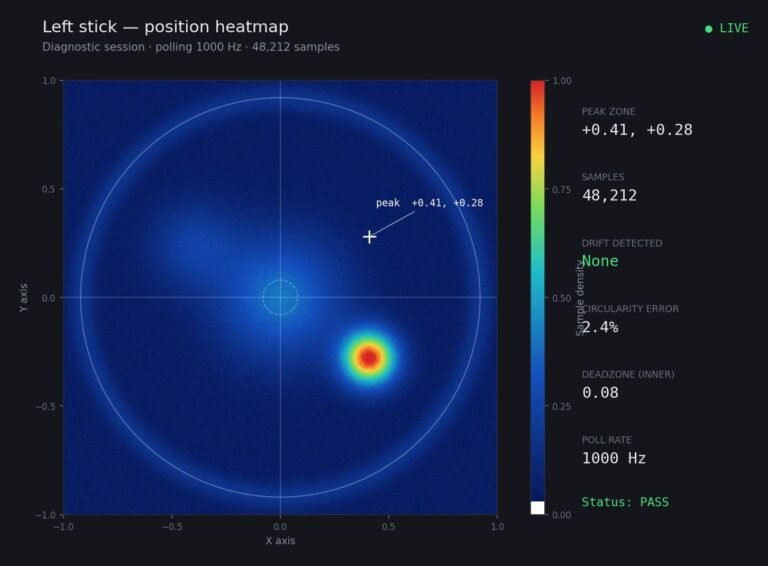
Someone posted a stick drift heatmap in a forum thread asking if their controller was dying: a red and orange blob…
The newest replies from players and the Gamepad Tester Team.